
Cooling Fan for Nintendo Switch 1/2
4.6Editor score
LED temperature display
Adjustable fan speed
Micro USB powered
This guide compares the top external cooling fans for Nintendo Switch docks to help you choose the best accessory for keeping your console cool during gameplay.
Keeping your gaming console at optimal temperatures is crucial for performance and longevity. External cooling fans provide essential heat dissipation for docks that tend to trap heat during long sessions.
We evaluated ten top-rated cooling solutions based on fan speed, noise levels, compatibility, and build quality. Each product was analyzed to ensure it meets the needs of various gaming setups and preferences.
Our picks highlight key features like adjustable speeds, LED displays, and seamless integration with official docks. Remember that prices and availability can change, so verify details before purchasing.
4.6Editor score

4.0Editor score
4.4Editor score
Compare all ten cooling solutions side by side to find the perfect match for your specific console model and gaming needs.


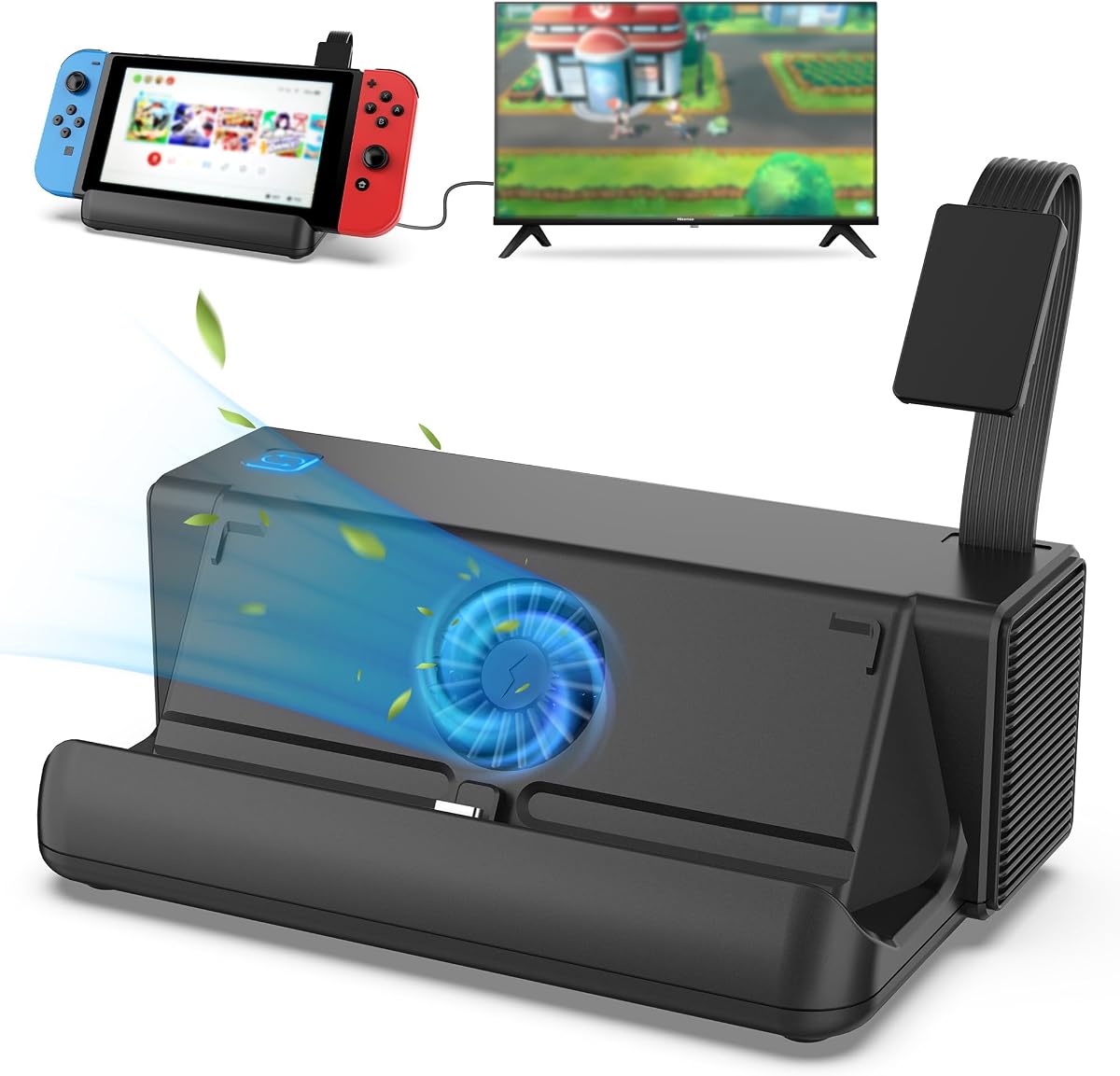
This cooling fan delivers strong protection for the standard Switch dock at an accessible price. It features a clear LED display for temperature and fan speed tracking alongside straightforward button controls.
We may earn a commission when you buy through this link, at no additional cost to you.
The adjustable speed range from 510 to 6000 RPM allows you to balance cooling performance with noise levels. Below 2400 RPM it operates nearly silently while still managing heat effectively during normal gaming sessions.
Higher speeds do produce noticeable fan sound which might distract during quiet game moments. However the fixed pad and sponge sides ensure the unit stays stable and protects your console from scratches.
It is a solid pick for budget conscious players who need reliable thermal protection. The included joystick caps and Micro USB cable add practical value for daily use.
Real-time temperature and RPM readings help you optimize cooling for different game intensity levels.
Sponge pads prevent scratches and keep the unit firmly in place between the dock and Switch.
We may earn a commission when you buy through this link, at no additional cost to you.
The TNP fan offers triple high-speed fans to enhance ventilation for original Switch docks. Its simple design makes installation quick and effective without needing extra tools.
We may earn a commission when you buy through this link, at no additional cost to you.
Adjustable turbo and normal modes give you flexibility to match cooling needs to your gaming intensity. The unit plugs directly into the dock USB port for power and starts working right away.
While three fans provide strong airflow the overall rating is lower than top alternatives. This suggests inconsistent build quality or noise levels compared to other models on the market.
Choose this if you need triple fan coverage and prioritize simplicity. It works smoothly for basic cooling needs while keeping your setup tidy.
Three internal fans increase air circulation to lower console temperature during extended sessions.
No external adapter is needed since it draws power from the dock USB port.
We may earn a commission when you buy through this link, at no additional cost to you.
This NEWDERY model targets Switch 2 docks with dual fans and a robust accessory hub. It auto-starts at full speed when connected ensuring immediate cooling as games load.
We may earn a commission when you buy through this link, at no additional cost to you.
Three cooling levels plus six game card slots offer convenience and customization. The three USB ports let you charge controllers or headsets without extra adapters.
RGB lighting adds style but can be turned off with a press. While it is bulkier than simple fans the extra ports and storage make it a useful all-in-one solution.
Ideal for Switch 2 owners who want expansion features alongside cooling. The auto start function simplifies use and extends your system lifespan.
The fan activates automatically when docked so cooling begins without manual steps.
USB-A and USB-C outputs provide extra charging options for controllers and accessories.
We may earn a commission when you buy through this link, at no additional cost to you.
The Bewinner base stands out with three internal fans and a compact layout. It is easy to set up and fits neatly on standard dock setups.
We may earn a commission when you buy through this link, at no additional cost to you.
A side switch allows turbo or normal cooling so you can adapt to heat levels. The superior material ensures the unit stays durable through regular gaming use.
Lack of digital displays means you must gauge cooling by touch or sound. This tradeoff keeps the price low and the design straightforward.
Buy this for a simple no fuss cooling boost. It works well for players who want triple fans without extra controls or lights.
Small footprint ensures it does not obstruct cables or add clutter.
Side switch toggles between turbo and normal modes for quick adjustments.
We may earn a commission when you buy through this link, at no additional cost to you.
ZMBESUP combines a full dock with built-in cooling and smart card tech. One-button switching protects your console and avoids physical swapping during gameplay.
We may earn a commission when you buy through this link, at no additional cost to you.
Independent switches let you turn off unused features to save energy. Eight card slots plus full port support make this a complete desktop and travel hub.
The price is higher than simple fans but the all-in-one utility justifies it. Original adapter is needed though so check power needs before buying.
Choose this for a premium upgrade that consolidates accessories. It protects your Switch from wear and keeps it cool.
Swap active games without touching the cartridge to reduce wear.
Switch between desktop play and 1080P TV output seamlessly.
We may earn a commission when you buy through this link, at no additional cost to you.
GLDRAM builds a cooler tailored for the 2021 OLED dock with exact fit. Blue lights add style while the turbo fans push heat away from the base.
We may earn a commission when you buy through this link, at no additional cost to you.
Fourteen card slots provide ample storage to avoid losing game cards. The Type-C connection ensures easy setup with plug-and-play power.
Lighting syncs with the fan and turns off together. While stylish the unit is dedicated to OLED owners only.
This is the go to choice for OLED dock users. Its tailored design and storage make it a practical upgrade.
Designed for HEG-007 dock to ensure perfect alignment.
Store up to fourteen cartridges safely on top of the unit.
We may earn a commission when you buy through this link, at no additional cost to you.
Dobe focuses on quiet high-speed airflow for OLED docks. A single fan pushes air quickly while keeping noise low for immersive play.
We may earn a commission when you buy through this link, at no additional cost to you.
Blue LED lights sync with the fan on and off. The Type-C input matches the OLED dock design for easy connection.
With just one fan it is simpler than triple fan units. This keeps costs down while still addressing overheating.
Select this if you prefer quiet operation without extra bulk. It fits the OLED dock well and works reliably.
High speed fan delivers cooling without distracting noise.
LED turns on and off with the fan for clean operation.
We may earn a commission when you buy through this link, at no additional cost to you.
This unit offers auto start with your Switch 2 for hands-free cooling. Three speeds let you tune performance to the task at hand.
We may earn a commission when you buy through this link, at no additional cost to you.
A 45mm turbine fan cuts operating noise while moving ample air. The vertical air duct aligns with the console intake for direct cooling.
Nano tape ensures stable placement though you may remove it for clean repositioning. Minimalist looks keep the focus on function.
Pick this for automatic and quiet cooling on Switch 2. The auto feature and fan size make it a smart choice.
Starts and stops with your console to eliminate manual control.
Vertical design targets the console air inlet for faster heat removal.
We may earn a commission when you buy through this link, at no additional cost to you.
This acrylic stand uses passive airflow to cool the Switch 2 dock without fans. It is silent and needs no electricity which simplifies setup.
We may earn a commission when you buy through this link, at no additional cost to you.
Raised hollowed-out structure boosts air circulation around the dock. Non-slip pads keep everything secure and protect surfaces from scratches.
Because there are no moving parts maintenance is minimal. It is a simple way to reduce overheating risks without noise.
Ideal for players who want noise-free cooling and a clean look. Place your dock on the stand and let airflow do the work.
No fans mean zero noise and zero power consumption.
Hollowed base increases air movement around the dock.
We may earn a commission when you buy through this link, at no additional cost to you.
This fan fits original dock stations and also supports the Steam Deck. It shows real-time speed and exhaust temperature on an LED panel.
We may earn a commission when you buy through this link, at no additional cost to you.
Adjustable speeds from 510 to 6000 RPM let you tailor cooling. The package includes stabilizer pads and caps which add practical value.
No rating is listed which makes verification harder. Still the warranty and compatibility make it a flexible option.
Consider this if you use multiple handhelds. The display and included accessories offer good utility.
Works with both Switch dock and Steam Deck.
Joystick caps and pads come in the box.
We may earn a commission when you buy through this link, at no additional cost to you.
Choosing the right fan involves checking compatibility fan speeds noise and extra features. This guide breaks down the key factors to consider.
Ensure the fan fits your dock model whether it is the original OLED or Switch 2. Units designed for specific docks align better with vents and ports.
Match the accessory to your hardware to avoid poor cooling or fit issues.
Adjustable speeds let you balance cooling power and noise. Look for ranges that offer low quiet modes and higher performance options.
Control buttons or auto start options improve usability during gameplay.
Fans powered by USB or Type-C simplify setup by drawing power from the dock. This removes the need for separate outlets.
Check that your dock provides enough ports for the fan and other accessories.
Cooling fans can be loud at high speeds. Reviews and specs often note decibel levels so check those if you play in quiet spaces.
Fans with turbo or quiet modes help reduce distraction.
Durable ABS or acrylic casings protect the unit and your console. Sturdy construction ensures stability when the dock is moved.
Sponge or rubber pads prevent scratches and slipping.
LED displays card slots USB ports or lighting can add convenience. Decide which extras matter for your setup before buying.
Avoid paying for features you will not use.
Plug-and-play fans that require no tools save time and effort. Look for clear instructions and straightforward mounting methods.
Quick setup means you spend more time playing and less time assembling.
A lifetime or long-term warranty signals confidence in the product. Check return policies and customer support responsiveness.
Reliable support helps resolve issues quickly if problems arise.
Connect the fan to your dock USB or Type-C port according to the product instructions. Ensure the fan aligns with the dock vents for maximum airflow.
Adjust the speed setting based on your gaming intensity. Use lower speeds for casual play and higher speeds for long demanding sessions.
Clean the fan blades and vents periodically to maintain performance. Dust buildup can reduce airflow and increase noise levels.
Most fans draw power from the dock USB port using included Micro USB or Type-C cables. You usually do not need a separate adapter unless your dock lacks free USB ports.
Using a third-party cooling accessory generally does not void your warranty as long as it does not damage the console. Always check your device terms and install carefully.
Look for game pauses lag or unexpected shutdowns. Some fans include LED temperature displays to show console air exit temperatures.
Noise varies by model and speed. Lower speeds often run quietly while turbo or max speeds may produce noticeable fan sound.
No these fans are designed for docked stations. For handheld mode rely on the console internal cooling or portable stands.
Clean every few months or when dust is visible. Use compressed air or a soft cloth to prevent airflow restriction.
Check the power connection and ensure the switch is on. Some fans require manual activation instead of auto start.
Yes effective cooling can prevent thermal throttling which sometimes causes input lag or system slowdown.
Our top picks include the NEWDERY Fan for Switch 2 features the ZMBESUP Dock for premium upgrades and the basic Fan for budget buyers. Each offers reliable cooling tailored to different needs.
Prioritize compatibility with your dock model and consider noise levels for your gaming space. Features like card storage or auto start can improve convenience.
Prices and availability change frequently so check the latest details on retailer sites. This ensures you get the best value for your gaming setup.