
TP-Link ER605
4.4Editor score
Five gigabit ports included
Multiple VPN protocol support
Advanced security firewall features
This guide compares the top ten load balancing routers for businesses and advanced users, evaluating performance, security, and multi-WAN capabilities to help
Load balancing routers ensure reliable internet by distributing traffic across multiple connections, preventing downtime and maximizing bandwidth efficiency for modern networks.
We evaluated ten top-rated models based on port flexibility, security features, VPN support, and ease of management to find the most effective solutions for diverse networking needs.
Each pick highlights unique strengths like failover speed, hardware acceleration, or cloud control, but note that prices and availability may shift frequently on retailer platforms.
4.4Editor score

4.7Editor score

4.0Editor score
The following table provides a side-by-side overview of the key specifications and capabilities for each of the ten routers reviewed in this guide.


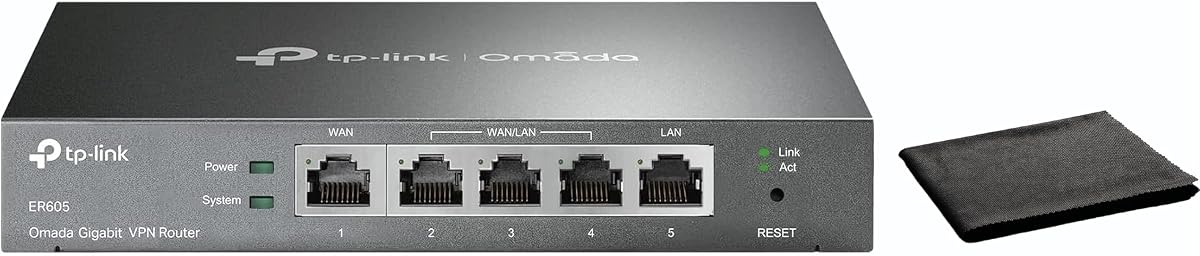

The TP-Link ER605 stands out as a reliable and cost-effective solution for small businesses needing basic load balancing capabilities without sacrificing essential security features.
We may earn a commission when you buy through this link, at no additional cost to you.
Its five gigabit ports allow you to connect multiple ISPs simultaneously, ensuring that if one line drops, your network stays online through automatic failover and traffic distribution.
While it lacks the high-end throughput of premium models, the ER605 handles typical office traffic well and offers robust VPN support for secure remote access to your network.
This router is ideal for small offices or remote workers who want a dedicated load balancing device that is easy to set up and manage through a straightforward web interface.
The ER605 supports up to three WAN connections and includes a USB port for mobile broadband backup, ensuring your internet stays up even when primary ISPs fail.
With advanced firewall policies, DoS defense, and IP filtering, the ER605 keeps your internal network safe from external threats while managing traffic efficiently.
We may earn a commission when you buy through this link, at no additional cost to you.
The TP-Link ER7206 is designed for growing networks that need to scale, offering support for up to four WAN connections and integration with the Omada SDN platform for centralized control.
We may earn a commission when you buy through this link, at no additional cost to you.
With a maximum of 700 clients and 150,000 associated devices, it handles dense environments like schools or large offices without dropping connections or slowing down traffic flow.
Its integration into the Omada ecosystem allows you to manage switches and access points from a single interface, making it a smart choice for existing Omada users looking to upgrade their gateway.
For enterprises that need centralized cloud management and robust security, the ER7206 delivers professional-grade performance and flexibility in a rack-mountable form factor.
Integrated control lets you manage gateways, switches, and APs together via hardware, software, or cloud controllers for seamless network expansion.
The ER7206 supports up to 700 concurrent clients, making it ideal for environments with high device density like conference centers or educational institutions.
We may earn a commission when you buy through this link, at no additional cost to you.
The Cudy R700 appeals to tech-savvy users who want the flexibility of OpenWRT combined with dedicated load balancing hardware, offering full customization of firewall and routing rules.
We may earn a commission when you buy through this link, at no additional cost to you.
It connects up to five ISPs with automatic failover, ensuring business continuity even when a connection drops, while providing built-in VPN protocols for secure remote access.
Although OpenWRT support is a powerful feature, it requires some technical expertise to configure advanced VLANs and QoS policies effectively, which might be a steep learning curve for beginners.
For home labs or small businesses that value open-source control and robust failover capabilities without a premium price tag, the R700 is a strong contender.
Full support unlocks VLAN segmentation, custom firewall rules, and community packages for professional-grade network management tailored to specific needs.
Built-in support for WireGuard, OpenVPN, and IPsec allows you to host remote access or site-to-site tunnels without additional hardware.
We may earn a commission when you buy through this link, at no additional cost to you.
The Alta Labs Route10 is a high-end routing solution designed for users who demand true 10-gigabit speeds and hardware-accelerated VPN performance without bottlenecks.
We may earn a commission when you buy through this link, at no additional cost to you.
It features four 2.5G ports and two 10G SFP+ ports, allowing you to run high-bandwidth applications like video editing or large file transfers smoothly across your network.
While it does not broadcast Wi-Fi itself, it supports seamless integration with Alta Labs access points and switches, providing a unified wired and wireless management platform.
For advanced home labs or enterprise networks where speed and real-time traffic visibility are critical, the Route10 offers unmatched performance and professional-grade control.
Powered by a Qualcomm quad-core processor, the Route10 ensures low latency and consistent multi-gigabit performance for heavy network workloads.
Select ports provide PoE+ power, allowing the router to directly power access points and edge hardware without extra adapters or injectors.
We may earn a commission when you buy through this link, at no additional cost to you.
The Omada ER7412-M2 is built for businesses that need to aggregate multiple broadband lines for maximum bandwidth, supporting load balancing on up to eleven WAN ports.
We may earn a commission when you buy through this link, at no additional cost to you.
It includes two 2.5G RJ45 ports and eight gigabit ports, providing flexible connectivity options for high-speed uplinks and local network segments.
With support for SSL, IPsec, WireGuard, and other VPN protocols, it ensures secure remote access and site-to-site connections essential for modern business operations.
Ideal for medium-sized enterprises already using the Omada ecosystem, this router offers robust performance and centralized management capabilities.
Load balancing on up to 11 WAN ports increases utilization rates of multi-line broadband to ensure consistent internet availability.
With 2.5G and gigabit ports plus SFP options, you can easily upgrade your network to support higher-speed internet connections.
We may earn a commission when you buy through this link, at no additional cost to you.
The TP-Link TL-R470T+ is a solid choice for small offices or internet cafes that need multiple WAN connections but do not require high-speed gigabit throughput.
We may earn a commission when you buy through this link, at no additional cost to you.
It provides four 10/100M WAN ports with advanced load balancing to guarantee maximum bandwidth and backup capabilities for reliable internet access.
With extensive client account management and PPPoE server support, administrators can control bandwidth resources for specific clients based on their unique application environments.
This cost-effective solution is perfect for basic business needs where stability and security are prioritized over ultra-high-speed internet access.
Administrators can manage extensive client accounts and marshal bandwidth resources to specific clients based on their unique application environments.
The router includes lightning protection and powerful DoS attack safeguards to protect your network from physical and digital threats.
We may earn a commission when you buy through this link, at no additional cost to you.
The TP-Link TL-R480T+ is a classic model known for its simplicity and reliability, offering a straightforward approach to load balancing with three configurable WAN/LAN ports.
We may earn a commission when you buy through this link, at no additional cost to you.
Its five-port design allows for flexible connectivity, making it easy to connect multiple ISPs for redundancy without needing complex configuration interfaces.
While it lacks the advanced features of newer models, the TL-R480T+ performs its core function well and is priced affordably for small setups.
This router is best suited for users who need a basic, no-fuss solution to ensure internet uptime through multiple connections.
With three configurable WAN/LAN ports, you can easily adapt the hardware to your specific network layout without technical challenges.
The TL-R480T+ provides a cost-effective way to implement load balancing for those on a budget who need basic redundancy.
We may earn a commission when you buy through this link, at no additional cost to you.
The TP-Link ER-605 is designed for easy deployment in business environments, featuring dual WAN ports for seamless load balancing and intuitive management tools.
We may earn a commission when you buy through this link, at no additional cost to you.
It offers robust security including SPI firewall and DoS defense, along with support for IPsec, PPTP, and L2TP VPN protocols to secure remote access.
Bandwidth management allows you to ensure optimal performance for critical applications, making it ideal for small and medium-sized businesses with limited IT staff.
With centralized cloud monitoring, you can track real-time network status and configurations remotely, simplifying ongoing maintenance and troubleshooting.
Intuitive web interface and Omada app compatibility allow for centralized cloud monitoring and easy configuration without deep technical knowledge.
Intelligent bandwidth management and QoS settings ensure optimal performance for critical business applications during high-traffic periods.
We may earn a commission when you buy through this link, at no additional cost to you.
The Ubiquiti EdgeRouter 4 is a highly capable router favored by network enthusiasts for its powerful hardware and flexible operating system that supports extensive customization.
We may earn a commission when you buy through this link, at no additional cost to you.
It features three gigabit ports and one SFP port, allowing for versatile connectivity options including fiber connections for high-speed uplinks.
Operating as a fanless device with low power consumption, it is energy-efficient and operates silently, making it suitable for office or home environments.
While it requires technical expertise to configure fully, the EdgeRouter 4 offers unmatched flexibility for those who want to build a custom network solution.
The router supports advanced configurations through its flexible operating system, allowing you to tailor network rules to exact needs.
With a fanless design and internal PSU, the device runs quietly and efficiently with minimal power usage for all-day operation.
We may earn a commission when you buy through this link, at no additional cost to you.
The Omada Fusion 2.5G represents the next generation of business routers, combining high-speed 2.5G ports with a touchscreen for on-site troubleshooting and management.
We may earn a commission when you buy through this link, at no additional cost to you.
It features a high-performance quad-core CPU and five 2.5G ports, delivering outstanding speed and rock-solid connectivity with up to 4-WAN load balancing.
With license-free cloud management and Bluetooth setup, this router simplifies deployment and remote control, reducing on-site work and saving valuable IT time.
For modern businesses that need speed, ease of use, and advanced monitoring capabilities, the Fusion 2.5G is a standout choice in the current market.
The touchscreen provides instant on-site insights including health scores and traffic stats, enabling quick troubleshooting without a laptop.
License-free cloud management allows remote access and batch adoption of Omada devices for rapid and efficient IT deployment.
We may earn a commission when you buy through this link, at no additional cost to you.
Selecting the right load balancing router involves evaluating hardware capabilities, port configurations, and security features that match your specific network demands.
Determine how many internet connections you need to aggregate, as most routers support between two and four WAN ports, while some enterprise models offer up to eleven.
Choose a device with enough physical ports to handle your current ISP count plus room for future expansion without requiring extra switches.
Consider the total throughput the router can handle when multiple WAN lines are active, especially if you have high-speed internet like 2.5G or 10G connections.
Ensure the CPU can process traffic at wire speed to avoid bottlenecks that negate the benefits of load balancing your bandwidth.
Failover speed dictates how quickly the router detects a downed connection and reroutes traffic to healthy links to minimize downtime for users.
Look for models with proactive health checks to ensure your business stays online even if a primary ISP experiences temporary outages.
If you need secure remote access, verify the router supports the necessary protocols such as WireGuard, OpenVPN, or IPsec for site-to-site tunnels.
Hardware-accelerated VPNs are preferable to maintain high performance without slowing down internet traffic when using encrypted connections.
A user-friendly interface simplifies daily management, whether through a web GUI, mobile app, or cloud dashboard for remote monitoring and configuration.
Choose a management system that aligns with your skill level and whether you need centralized control across multiple sites.
Robust security is critical for load balancing routers since they act as the first line of defense against external threats like DoS attacks and unauthorized access.
Look for built-in firewalls, SPI inspection, and IP/MAC filtering to protect your internal network effectively from external intrusions.
Prices vary significantly from basic consumer units to high-end enterprise gateways, so set a realistic budget based on your need for speed and redundancy.
Investing slightly more in hardware acceleration and security features can prevent costly downtime and security breaches down the line.
If you already use specific access points or switches, choose a router that integrates with that ecosystem for unified management and easier troubleshooting.
Ecosystem integration ensures all your devices communicate seamlessly and simplifies firmware updates and configuration consistency.
Start by connecting your ISPs to the designated WAN ports and verify that all connections are active through the router's status dashboard.
Configure load balancing policies to match your business needs, such as weighted distribution based on speed or priority for specific applications.
Regularly update the firmware to ensure security patches are applied and monitor the logs to troubleshoot any connectivity issues promptly.
Load balancing distributes network traffic across multiple internet connections to maximize throughput and reliability. If one connection fails, the router automatically reroutes traffic to prevent downtime.
For most home users, a standard router suffices. However, if you require guaranteed uptime for remote work or have multiple ISPs, a load balancing router ensures consistent connectivity.
The router constantly monitors each WAN connection. If a link drops, it instantly switches traffic to the remaining active connections to maintain internet access.
Yes, most load balancing routers support various VPN protocols like WireGuard and IPsec, allowing secure remote access to your network resources.
If your router runs out of ports, you can connect a managed or unmanaged switch to the LAN ports to expand your local network without affecting load balancing.
Load balancing spreads traffic across all active connections to increase speed. Failover only uses backups when primary links fail, though most routers do both simultaneously.
Modern routers offer intuitive web interfaces or apps. However, advanced settings may require basic networking knowledge to configure correctly for optimal performance.
Yes, dedicated load balancing routers usually lack built-in Wi-Fi. You must connect a separate wireless access point to provide wireless coverage to your devices.
Our top picks cover various needs, from the affordable TP-Link ER605 for basic setups to the high-speed Alta Labs Route10 for power users demanding performance.
Prioritize WAN capacity and throughput when choosing, ensuring the device can handle your specific connection speeds and number of ISPs without slowing down traffic.
Prices and availability fluctuate frequently so always check current listings before buying to secure the best deal for your network configuration.