
GIGABYTE B550 Gaming X V2
4.5Editor score
Affordable AM4 platform support
Reliable 10+3 power design
Includes RGB Fusion lighting
Discover the top Gigabyte motherboard options for AMD and Intel platforms. This guide compares performance, features, and value to help you build the perfect
Choosing the right motherboard is critical for any PC build. Gigabyte offers a wide range of boards that balance performance, connectivity, and reliability for gamers and creators alike.
We analyzed the latest Gigabyte models across AMD and Intel platforms. Our comparison focuses on power delivery, thermal design, expansion slots, and modern connectivity features like USB-C and Wi-Fi.
Each pick highlights specific strengths for different needs. Prices and availability change frequently, so verify details before purchasing to ensure you get the best value for your system.
4.5Editor score

4.4Editor score

4.2Editor score
This table provides a side-by-side look at the top ten Gigabyte motherboards. Compare sockets, memory support, power phases, and key connectivity features to find the perfect match for your build.


The GIGABYTE B650 AORUS Elite AX stands out as a top choice for AMD AM5 users. It earns a strong rating for its balanced combination of power delivery, thermal management, and modern connectivity. This board is ready for the latest Ryzen 9000 and 7000 series processors with DDR5 memory support.
We may earn a commission when you buy through this link, at no additional cost to you.
Its 14+2+1 power phase design ensures stable power for high-performance CPUs, even during demanding tasks. The thermal design includes fully covered MOSFET heatsinks and a dedicated M.2 Thermal Guard to keep temperatures low. Connectivity is future-ready with PCIe 5.0 slots and USB-C ports on both front and rear.
While the price is higher than entry-level boards, the added features justify the cost for enthusiasts. The EZ-Latch system makes building easier by simplifying GPU and RAM installation. Some users may need to update the BIOS for the newest CPU models, which is a minor trade-off.
This motherboard is ideal for gamers and creators building a new AM5 system. It offers the reliability and features needed for a high-end PC. We recommend it for anyone seeking a versatile board that can grow with future upgrades.
The digital VRM solution provides consistent power to the CPU, preventing throttling under heavy loads.
Support for PCIe 5.0 and USB 3.2 Gen 2 ensures compatibility with next-generation devices.
We may earn a commission when you buy through this link, at no additional cost to you.
The X870 AORUS Elite WIFI7 brings cutting-edge features to the AM5 platform. It is designed for users who need the fastest wireless and wired connectivity available. The board supports the latest Ryzen processors with robust power delivery for sustained performance.
We may earn a commission when you buy through this link, at no additional cost to you.
Key features include Wi-Fi 7 for reduced latency and USB4 ports for rapid data transfer. The thermal design protects VRMs and M.2 drives with dedicated guards. Four M.2 slots provide ample room for high-speed SSDs without needing additional cards.
The main drawback is the premium price, which reflects the advanced chipset capabilities. Large ATX cases are needed to accommodate its size and heatsinks. For users needing top-tier connectivity, the cost is justified by the long-term value.
This board suits professionals and enthusiasts who prioritize speed and future-proofing. It offers a complete package for high-end AM5 builds. We suggest it for those planning to use USB4 devices or require wireless network excellence.
Wi-Fi 7 and USB4 offer bandwidth that supports 8K streaming and fast external storage.
Four M.2 slots allow for multiple high-capacity SSDs in a single slot without adapters.
We may earn a commission when you buy through this link, at no additional cost to you.
The X870E AORUS PRO ICE offers a distinct white look for custom PC builds. It matches the performance of the standard X870E with top-tier power and connectivity. This board supports Ryzen 9000 and 7000 series CPUs with DDR5 memory.
We may earn a commission when you buy through this link, at no additional cost to you.
Its 16+2+2 power phase design ensures stable delivery for overclocking. The thermal guards and covered heatsinks keep components cool under load. Connectivity includes Wi-Fi 7 and USB4 ports for the latest peripherals.
The white design is a key draw for aesthetic-focused builders, though it may require more maintenance to stay clean. The higher price is due to the special finish and premium components. It is a great choice for matching white hardware.
This board is perfect for creators wanting a cohesive white system. It delivers the same performance as black models while looking unique. We recommend it for builds where visual appeal is as important as power.
The white PCB and heatsinks create a striking look for clean, themed computer cases.
Despite the color change, performance matches the flagship X870E in all key areas.
We may earn a commission when you buy through this link, at no additional cost to you.
The Z890 AORUS Master is a flagship board for Intel Core Ultra users. It offers extreme power delivery and connectivity for professional workstations. The board supports Intel Ultra Series 2 processors with advanced thermal management.
We may earn a commission when you buy through this link, at no additional cost to you.
Thunderbolt 4 and 10GbE LAN provide unmatched speed for data and networking. The power design uses 110A stages to handle high-end CPUs easily. Five M.2 slots allow for extensive SSD arrays without extra cards.
The main downside is the cost, which is justified only for those needing these features. The new LGA 1851 socket means future upgrades are limited to the current generation. It is best for users planning a high-performance workstation.
This board is ideal for content creators and engineers needing maximum performance. It delivers reliability and speed for demanding workflows. We suggest it for professionals prioritizing networking and storage speed above all.
Thunderbolt 4 and 10GbE LAN enable rapid file transfers and connectivity for high-end peripherals.
The 18+1+2 power design ensures stable operation for the most powerful Intel Core Ultra chips.
We may earn a commission when you buy through this link, at no additional cost to you.
The B650 Eagle AX offers great value for users building an AM5 system. It supports Ryzen 9000 and 7000 series with stable power delivery. The board is designed to be reliable without expensive premium features.
We may earn a commission when you buy through this link, at no additional cost to you.
Its 12+2+2 power design is enough for most mid to high-end CPUs. Thermal guards keep SSDs cool, and Wi-Fi 6E ensures fast wireless. USB 3.2 Gen 2×2 Type-C provides quick data access for peripherals.
The main trade-off is fewer storage slots compared to top models. Build quality is functional but less refined than AORUS boards. However, it remains a solid choice for budget-conscious builders.
This board is ideal for gamers wanting AM5 without overspending. It provides the essential features needed for a modern PC. We recommend it for those seeking reliable performance at a lower cost.
The VRM design handles Ryzen CPUs well, ensuring stability for gaming and general use.
Wi-Fi 6E and USB-C keep the system connected without needing extra cards or hubs.
We may earn a commission when you buy through this link, at no additional cost to you.
The B550 AORUS Elite AX V2 is a perfect choice for AM4 upgraders. It supports Ryzen 5000 and 3000 series with robust power delivery. This board ensures existing AM4 systems can run latest CPUs efficiently.
We may earn a commission when you buy through this link, at no additional cost to you.
Its 12+2 power phase allows for safe overclocking of Ryzen CPUs. Features like Q-Flash Plus simplify BIOS updates without needing the CPU installed. Connectivity includes Wi-Fi 6 and USB-C for modern peripherals.
Limitations include DDR4 memory, which is slower than newer DDR5 options. The lack of PCIe 5.0 means future GPUs might not utilize full speed. Still, for current AM4 needs, it offers excellent value.
This board is ideal for users upgrading older PCs without a full rebuild. It provides reliability and features at a reasonable cost. We suggest it for anyone staying on AM4 for another generation.
Q-Flash Plus allows BIOS updates to support new CPUs without installing hardware first.
The digital twin power design ensures stable power delivery for all supported Ryzen processors.
We may earn a commission when you buy through this link, at no additional cost to you.
The Z790 Eagle AX offers essential Z790 features at an accessible price. It supports Intel 14th and 13th Gen with DDR5 and PCIe 5.0. This board is a practical choice for mainstream builds.
We may earn a commission when you buy through this link, at no additional cost to you.
Its power design handles most non-K processors well, but may struggle with extreme overclocking. Wi-Fi 6E ensures reliable wireless, and USB-C provides fast data transfer. The EZ-Latch system makes GPU installation easier.
Thermal solutions are adequate for stock speeds but less robust than premium models. The lack of advanced VRM cooling limits sustained high loads. It remains a good choice for average users not overclocking heavily.
This board is ideal for gamers wanting a modern Intel platform. It balances cost and performance effectively for daily use. We recommend it for users who do not need top-tier power delivery.
DDR5 and PCIe 5.0 support futureproof the system without the price of higher-end boards.
EZ-Latch mechanisms for GPU and RAM simplify building and upgrading the system.
We may earn a commission when you buy through this link, at no additional cost to you.
The Z790 AORUS Elite AX offers a balanced step up for Intel users. It supports Core 14th Gen with stable power delivery and DDR5 memory. This board provides better thermal and storage options than basic models.
We may earn a commission when you buy through this link, at no additional cost to you.
Its 16+1+2 power design supports overclocking and high-end CPUs. Four M.2 slots allow for plenty of fast storage. Thermal armor ensures VRMs stay cool during intensive tasks.
The price is higher than entry-level boards, but the features justify it. The lack of top-tier BIOS tools limits advanced tweaking. It is a solid choice for most mainstream to enthusiast builds.
This board is ideal for gamers and creators needing reliability. It delivers strong performance without the cost of flagship boards. We recommend it for users seeking a reliable LGA 1700 platform.
Improved VRM cooling and higher phase count ensure stability under heavy loads.
Four M.2 slots allow for multiple high-speed SSDs without needing PCIe add-in cards.
We may earn a commission when you buy through this link, at no additional cost to you.
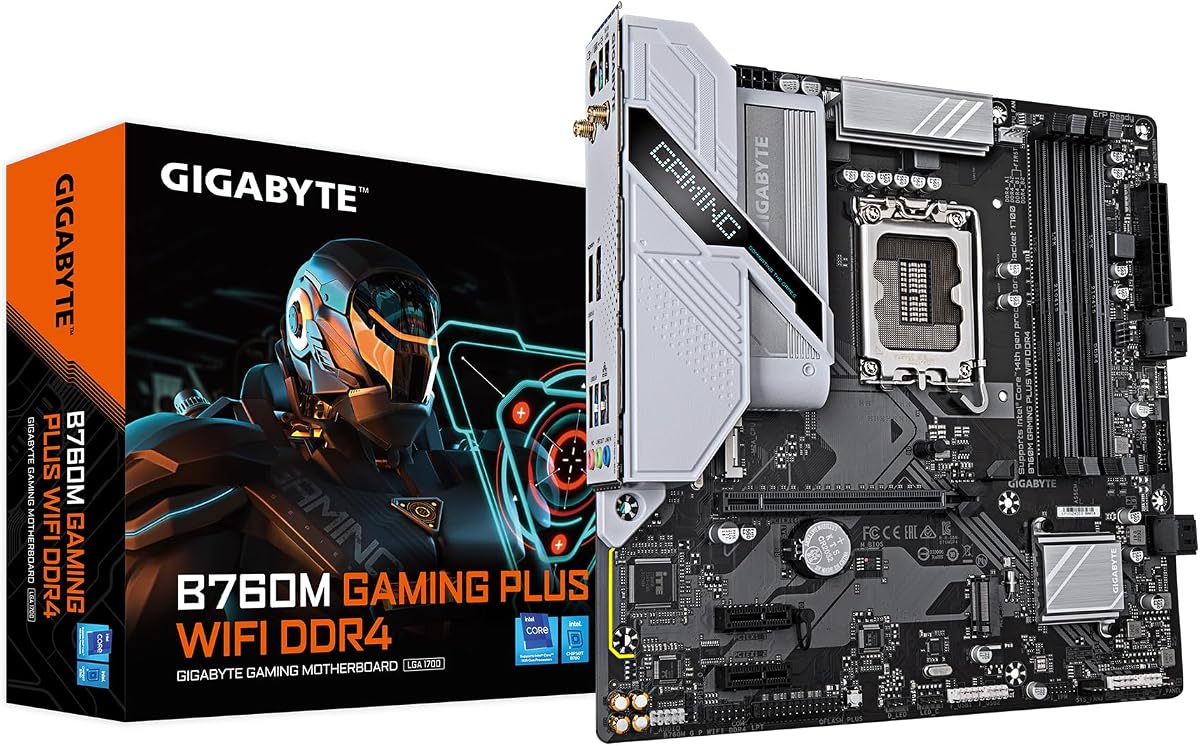
The B760M Gaming Plus WiFi offers a compact solution for Intel users. It supports 14th and 12th Gen CPUs with DDR4 memory. The M-ATX form factor fits smaller cases without sacrificing connectivity.
We may earn a commission when you buy through this link, at no additional cost to you.
Its power design is suitable for non-overclocked builds. Wi-Fi ensures connection without cables, and USB-C ports provide modern IO. Q-Flash Plus simplifies updates for new CPUs.
The main trade-off is the weaker power design and older DDR4. This limits performance for high-end or overclocked systems. However, it is great for budget or small form factor PCs.
This board is ideal for users needing a small Intel system. It balances price and features effectively for general use. We recommend it for builds prioritizing size and simplicity.
M-ATX size ensures compatibility with compact cases while maintaining essential features.
Integrated Wi-Fi removes the need for Ethernet cables in flexible setups.
We may earn a commission when you buy through this link, at no additional cost to you.
The B550 Gaming X V2 is the go-to for budget AM4 builds. It supports Ryzen 5000 and 3000 series with stable power. This board proves you do not need to spend much for reliability.
We may earn a commission when you buy through this link, at no additional cost to you.
Its 10+3 power design handles mid-range CPUs well. USB-C and LAN provide essential connectivity. Q-Flash Plus allows BIOS updates for newer CPUs without installing them.
Thermal protection is basic, so overclocking is limited. The lack of Wi-Fi requires an Ethernet cable or adapter. However, for its price, it offers exceptional value.
This board is ideal for budget gamers building a first PC. It delivers essential features at a low cost. We recommend it for anyone needing a reliable and affordable AM4 motherboard.
The power stages are sufficient for most gaming CPUs without premium heat costs.
USB-C and LAN provide the connections most users need without unnecessary extras.
We may earn a commission when you buy through this link, at no additional cost to you.
Selecting the right motherboard involves matching your CPU, budget, and future needs. This guide outlines the key factors to consider before making a purchase.
Ensure the motherboard supports your chosen processor. Gigabyte offers boards for AM5 and AM4 for AMD, and LGA 1851 and LGA 1700 for Intel. Choosing the wrong socket will prevent installation.
Always verify that the CPU generation is supported by the board's chipset and BIOS version before buying.
Check if the board uses DDR4 or DDR5 memory. Newer AM5 and Z790 boards typically use DDR5, which offers faster speeds but costs more. DDR4 boards are cheaper but limit future performance.
Choose DDR5 for new builds and DDR4 for budget AM4 upgrades to balance performance and cost.
VRM phases determine how stable power is delivered to the CPU. Boards with more phases (e.g., 16+2+2) handle high-end CPUs and overclocking better than basic 10+3 models.
For gaming or productivity, select a board with at least 12+ power phases to ensure thermal stability.
Look for PCIe 5.0 support if you plan to use next-gen GPUs or NVMe drives. Many current boards support PCIe 5.0 but may not fully utilize it until new components arrive.
Prioritize boards with M.2 slots that match your storage needs, as some budget models limit the number of SSD slots.
Modern motherboards offer USB-C and Wi-Fi. Check for USB-C ports on both front and rear for easy peripheral access. Wi-Fi is essential if your case lacks easy LAN cabling.
Ensure the board has enough rear USB ports for your devices, including cameras, drives, and peripherals.
Gigabyte makes ATX and M-ATX boards. ATX fits standard cases, while M-ATX suits smaller builds. Ensure the case supports the board's size for a proper fit.
Measure your case dimensions to avoid compatibility issues with larger boards or heatsinks.
Look for boards with a solid warranty and easy BIOS update tools like Q-Flash. This helps support future CPUs without needing to install hardware first.
A good warranty and update tools ensure your motherboard remains useful for several years.
Many boards include RGB Fusion lighting for customization. If you want a specific look, choose a board that matches your theme or includes RGB headers for add-ons.
White boards offer a clean aesthetic for custom builds, while black models blend into most cases.
Before installing the motherboard, connect front panel cables carefully. Use the provided standoffs to avoid short circuits in the case. Secure all mounting screws evenly to prevent warping.
Install the latest BIOS and drivers from Gigabyte's website after first boot. This ensures stability for all your components and CPU features. Use Q-Flash Plus if BIOS updates are needed without installing the CPU.
Keep the case cool and clean to maintain thermal performance. Dust the heatsinks and fans regularly. Monitor temperatures using Gigabyte apps or system tools to ensure stability under load.
Gigabyte AM5 motherboards like the B650 AORUS Elite AX and X870 Elite support Ryzen 9000 series processors. Always check the official CPU support list for specific BIOS requirements before buying.
No, DDR4 models still exist for AM4 and some older Intel boards. However, most new AM5 and Z790 boards require DDR5 for modern performance and compatibility.
Yes, provided the new CPU is supported by the socket and BIOS. Gigabyte offers Q-Flash Plus on many boards for updating BIOS without installing the new CPU first.
The GIGABYTE X870E AORUS PRO ICE is the best choice for white builds. It features a white PCB and heatsinks to match other white components.
Many Gigabyte boards support overclocking, especially Z790, Z890, and B650 models. Check the power design for higher VRM phases if you plan to overclock heavily.
AORUS boards typically have better power design, cooling, and features compared to the Eagle series. Eagle models are more affordable for users with simpler needs.
Choose based on your CPU socket, budget, and need for modern features like DDR5 or Wi-Fi. Compare specifications in our guide to match your build requirements.
Gigabyte offers a wide range of motherboards for every budget and build type. Whether you need a budget AM4 board or a premium AM5 model, there is a suitable option available for your needs.
Focus on the features that matter most, such as power delivery for high-end CPUs or connectivity for modern peripherals. The top picks balance performance and value effectively.
Always verify current prices and availability before purchasing. Prices change frequently, and selecting the right board ensures your system remains relevant for years.