
Behringer X AIR XR18
4.6Editor score
Tablet controlled
18 inputs
WiFi router built-in
This guide compares the top digital mixing consoles for live sound and studio use, highlighting features like channel count, fader quality, and connectivity
Digital mixing consoles have revolutionized how audio engineers manage sound in both live and studio environments. These devices offer precise control over multiple audio channels, effects, and routing options in a single compact unit.
We evaluated the leading models based on input capacity, sound quality, user interface design, and connectivity features. Our analysis covers options ranging from compact mixers to large-scale production consoles.
Each selection includes detailed specifications and real-world performance notes to help you make an informed decision. Please note that product availability and pricing may change over time.
4.6Editor score

4.7Editor score

4.0Editor score
The following table provides a side-by-side comparison of the top digital mixing consoles available in the market today. Each entry highlights key specifications to help you find the right match for your audio needs.




The Behringer X32 stands out as a top-tier digital mixing console for both live and studio applications. With a high user rating, it delivers professional-grade audio performance that meets demanding standards.
We may earn a commission when you buy through this link, at no additional cost to you.
Its 40 input channels and 25-bus architecture provide immense flexibility for complex setups. The MIDAS-designed preamps ensure audiophile-quality sound, while motorized faders allow for precise scene management.
While the console offers extensive features, it may require time to master for new users. However, the detailed documentation and active user community make the learning process manageable.
This console is ideal for sound engineers who need reliability and versatility. Its robust build and comprehensive feature set make it a reliable choice for professional environments.
The MIDAS-designed preamps deliver clear and detailed audio reproduction across all channels.
Motorized faders and dynamic LCD strips streamline workflow and reduce setup time.
We may earn a commission when you buy through this link, at no additional cost to you.
The Yamaha DM3 Standard offers a powerful yet compact digital mixing solution for smaller venues and studios. Its renowned sound quality and high sample rate make it a standout choice.
We may earn a commission when you buy through this link, at no additional cost to you.
This console features 22 channels and a best-in-class 9-inch touchscreen for easy operation. The 18×18 USB audio interface allows for seamless recording and playback integration.
While its channel count is lower than larger models, it remains sufficient for many applications. Users appreciate the intuitive interface and reliable Yamaha engineering.
Ideal for portable setups and smaller productions, this mixer delivers professional results without the bulk. It balances performance and portability effectively.
A 96kHz sample rate ensures crystal-clear audio reproduction for recording and live use.
The large touchscreen simplifies mixing tasks and provides quick access to settings.
We may earn a commission when you buy through this link, at no additional cost to you.
The Behringer WING brings a new level of precision to digital mixing with its full stereo architecture. Designed for professional environments, it supports up to 48 channels and 28 buses.
We may earn a commission when you buy through this link, at no additional cost to you.
Its 24 motorized faders are organized into configurable sections for efficient control. The AES50 connectivity ensures ultra-low jitter and latency for remote I/O setups.
While the console is more expensive than standard models, its feature set justifies the cost for serious engineers. The large capacitive touchscreen enhances operational ease.
Best suited for large-scale productions, the WING delivers robust performance and flexibility. Its design prioritizes workflow efficiency and sound accuracy.
Klark Teknik SuperMAC technology ensures reliable high-speed data transmission.
Three separate fader sections allow custom setups for different mixing scenarios.
We may earn a commission when you buy through this link, at no additional cost to you.
The Yamaha MGX12 delivers exceptional performance with a perfect user rating, making it a favorite for multimedia applications. Its inclusion of video pass-through sets it apart from typical mixers.
We may earn a commission when you buy through this link, at no additional cost to you.
Features like dual USB-C audio interface and a 4.3-inch touchscreen enhance usability. The bundled software adds value, providing essential tools for recording and editing.
While it has fewer channels than larger consoles, it covers most needs for small to mid-sized setups. The tactile faders and assistive features streamline daily operations.
This console is perfect for content creators and small production teams needing audio and video integration. Its balance of features and usability is outstanding.
USB-HDMI interface enables 4K video capture and pass-through during audio mixing.
Included software bundle offers professional tools without extra purchase costs.
We may earn a commission when you buy through this link, at no additional cost to you.
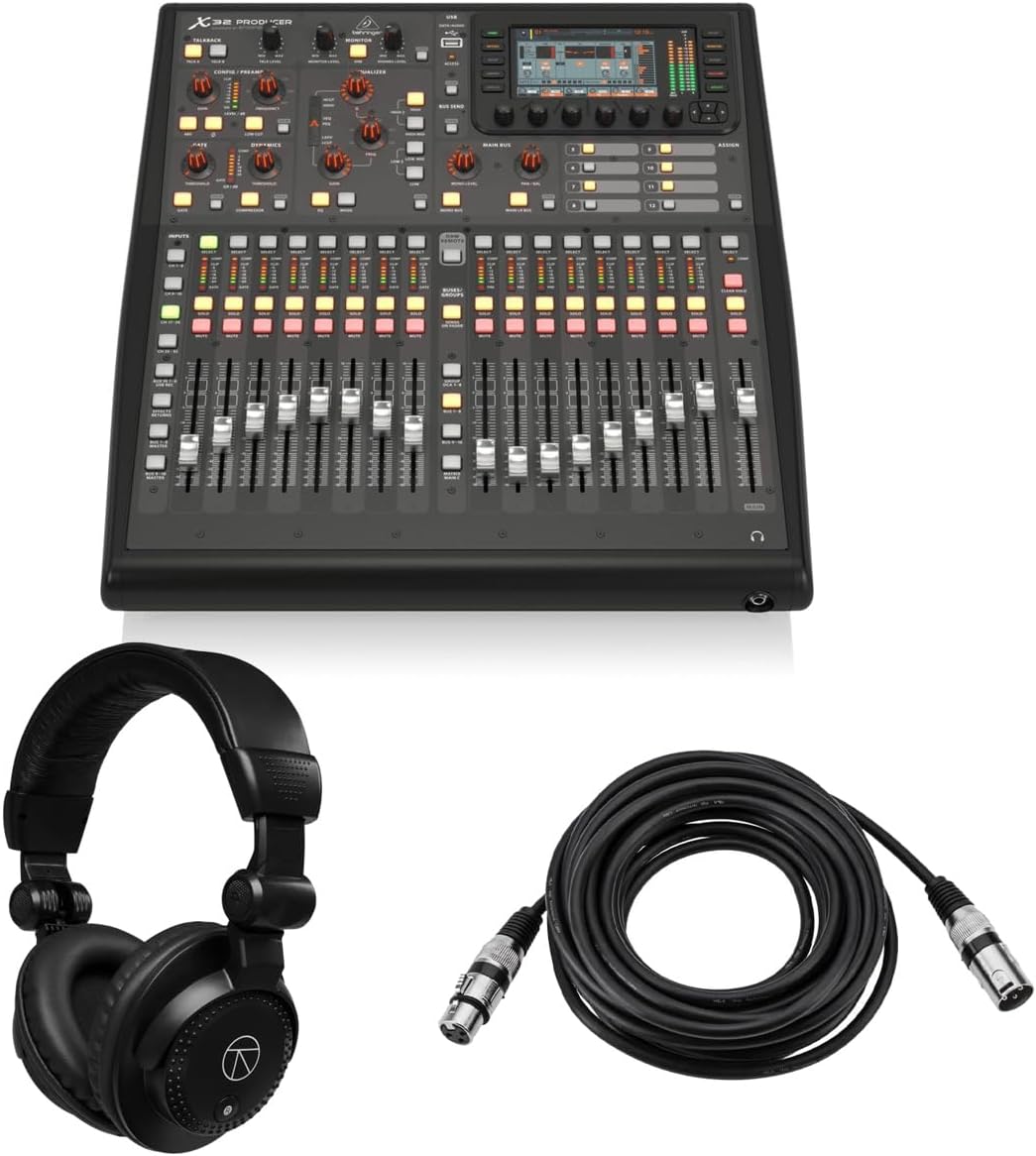
The Behringer X32 Producer combines high-quality audio with space-saving rack-mount design. Users praise its perfect rating for reliable performance in demanding environments.
We may earn a commission when you buy through this link, at no additional cost to you.
It offers 40 input channels and 16 MIDAS preamps for superior sound quality. The included headphones and cable bundle add immediate value for new setups.
While rack-mounting may require additional installation effort, it frees up floor space. The 5-inch TFT display provides clear visibility of workflow components.
This console is ideal for broadcast and touring applications where space and reliability matter. Its robust build ensures consistent results over time.
24-bit/48 kHz conversion delivers an impressive 114 dB dynamic range for clarity.
Included accessories allow immediate deployment without extra purchases.
We may earn a commission when you buy through this link, at no additional cost to you.
The Behringer X32 Compact offers the power of the standard X32 in a smaller footprint. Its high user rating reflects strong performance and reliability for live sound.
We may earn a commission when you buy through this link, at no additional cost to you.
Despite its compact size, it retains 40 inputs and 25-bus architecture. The 17 motorized faders and LCD Scribble Strips enhance intuitive control.
While it has slightly fewer outputs than the full-size model, it suffices for most venues. Users appreciate the balance between portability and capability.
This mixer is perfect for touring bands and portable production crews. It delivers professional audio without taking up excessive space.
Reduced size allows fitting into tight racks or transport cases easily.
Retains key features like faders and routing for familiar workflow.
We may earn a commission when you buy through this link, at no additional cost to you.
The PreSonus StudioLive Classic 16.0.2 provides a reliable option for users seeking straightforward mixing features. It is known for its Fat Channel signal processing across all channels.
We may earn a commission when you buy through this link, at no additional cost to you.
With 16 inputs and a 18-in/16-out USB interface, it supports flexible recording workflows. The included software library adds significant value for producers.
While user ratings are lower than newer models, it remains a solid choice for budget-conscious buyers. The MIDI I/O enhances connectivity with external gear.
This console suits home studios and smaller venues needing essential mixing tools. Its straightforward design ensures ease of use.
Fat Channel EQ and dynamics on every channel provide detailed control.
Free Studio One Artist and UC Surface software support Mac and Windows.
We may earn a commission when you buy through this link, at no additional cost to you.
The Behringer X AIR XR18 offers exceptional value for those seeking a digital mixing solution at an accessible price point. Its tablet control and integrated WiFi make it highly portable.
We may earn a commission when you buy through this link, at no additional cost to you.
It features 16 MIDAS-designed preamps for quality sound and an 18×18 USB interface. The tri-mode Wi-Fi router allows direct operation without external hardware.
While it lacks physical faders, the remote operation appeals to users prioritizing flexibility. The user rating reflects strong satisfaction with its performance.
Ideal for indie bands and mobile DJs, this mixer blends affordability with professional features. It is a top choice for budget-conscious professionals.
Direct WiFi connection eliminates need for extra routers or cables.
iOS and Android apps provide intuitive control from familiar devices.
We may earn a commission when you buy through this link, at no additional cost to you.
The Allen & Heath Qu-5 represents premium digital mixing with its 96kHz FPGA processing and extensive connectivity. It stands out for exceptional audio quality and low latency.
We may earn a commission when you buy through this link, at no additional cost to you.
Its flexible mixing architecture supports up to 38 inputs and customizable channel layers. The 7-inch capacitive touchscreen and motorized faders streamline operations.
While the cost is high, the performance and build quality justify it for professionals. The integrated recording and effects reduce need for external gear.
This mixer is perfect for high-end live sound and installed audio systems. Its design prioritizes reliability and audio fidelity.
XCVI FPGA Processing ensures ultra-low latency for real-time audio.
Built-in recording and effects engines simplify system requirements.
We may earn a commission when you buy through this link, at no additional cost to you.
The QSC TouchMix-16 delivers a complete digital mixing package with all input channels featuring gate and compressor. Its high rating reflects ease of use and reliability.
We may earn a commission when you buy through this link, at no additional cost to you.
This mixer includes 20 inputs with full parametric EQ on all channels. The built-in bag supports portability for mobile applications.
While routing options are more limited than larger consoles, it suits focused setups. The TRS aux outs allow direct IEM monitoring for performers.
Best for solo artists and small bands, this mixer simplifies live sound. Its ready-to-go design reduces setup time.
Every input channel includes gate and compressor for clean sound.
Included bag protects the unit and aids in transport.
We may earn a commission when you buy through this link, at no additional cost to you.
Selecting the right digital mixing console requires evaluating several key factors to ensure it meets your specific audio production needs.
Determine the number of microphones and line inputs you regularly need. Higher channel counts offer more flexibility but increase cost and complexity.
Choose a console with enough inputs for current and future projects to avoid frequent upgrades.
Look for consoles with high-quality preamps to ensure clean amplification of microphone signals. Brands like MIDAS and Yamaha are known for excellent audio fidelity.
Prioritize models with good dynamic range and low noise floor for professional sound.
Consider whether physical faders or touchscreen controls better fit your workflow. Motorized faders are helpful for scene changes and recall.
Ensure the display and layout are intuitive to reduce setup time during live events.
Check for USB interfaces, WiFi modules, or expansion ports like AES50 or SLink. These features enable recording and remote control capabilities.
Confirm compatibility with your DAW and existing audio gear for seamless integration.
Built-in DSP and effects engines reduce reliance on external processors. Look for reverb, EQ, compression, and other tools on every channel.
Strong onboard processing allows you to maintain a compact setup without sacrificing features.
For touring or mobile use, prioritize compact designs with durable construction. Rack-mountable options save floor space and are robust for transport.
Ensure the console can withstand the rigors of your intended environment.
Balance the cost against the features you actually need. Entry-level models offer great value for beginners while pro-grade units justify higher prices.
Avoid overspending on capabilities that will not be utilized regularly.
Evaluate the quality of companion apps and driver support. Strong software ecosystems enhance control and remote operation capabilities.
Active communities and documentation help resolve issues and improve workflow efficiency.
Start by connecting all microphones and instruments to the appropriate inputs. Configure input gain levels carefully to avoid clipping and maintain clarity.
Use scene recall features to save setups for different venues or performances. This reduces the time needed to prepare for each new event.
Protect your console from dust and extreme temperatures when not in use. Regular firmware updates ensure optimal performance and access to new features.
Digital mixers offer precise control, scene recall, and built-in processing that reduce the need for external gear. They also provide greater flexibility in routing and monitoring options.
No, most digital mixers function independently with their own internal processing. However, computers or tablets can be used for remote control or recording.
Typically 16 to 32 inputs are sufficient for small to mid-sized bands. Larger productions may require 40 or more inputs depending on instrument and vocal count.
Yes, many models include USB interfaces that allow multitrack recording directly to a computer. This makes them versatile for both live sound and studio work.
Motorized faders automatically move to match saved scenes or settings. This helps with quick setup changes and consistent mix recalls across multiple events.
While they have a learning curve, most models include user-friendly interfaces and extensive tutorials. Practice and familiarity with your specific model will improve proficiency over time.
Our top picks highlight the Behringer X32 for overall performance, the X AIR XR18 for budget value, and the Qu-5 for premium processing. Each option offers unique strengths for different production needs.
Prioritize factors such as input count, sound quality, and connectivity when making your final selection. Consider how your needs may evolve to ensure long-term usability.
We recommend verifying current specifications and availability with retailers before purchasing. Prices and features may change as technology advances over time.