
Yealink Sp92 Conference Speaker
4.1Editor score
AI noise cancelling support
20-hour call time
Teams certified operation
This guide compares the top Bluetooth speakerphones for the home office, evaluating audio clarity, microphone range, and connectivity to help you choose the
Finding the right Bluetooth speakerphone for the home office is essential for seamless virtual meetings. You need clear audio, reliable connectivity, and a design that fits your workspace without cluttering your desk.
We evaluated ten top-rated conference devices based on microphone quality, battery life, and platform compatibility. Each product was analyzed for its ability to handle noise cancellation and deliver professional sound quality during calls.
Our selections highlight key features like voice enhancement and portable design to suit different needs. Prices and availability may change, so verify details before purchasing to ensure you get the best value for your setup.
4.1Editor score
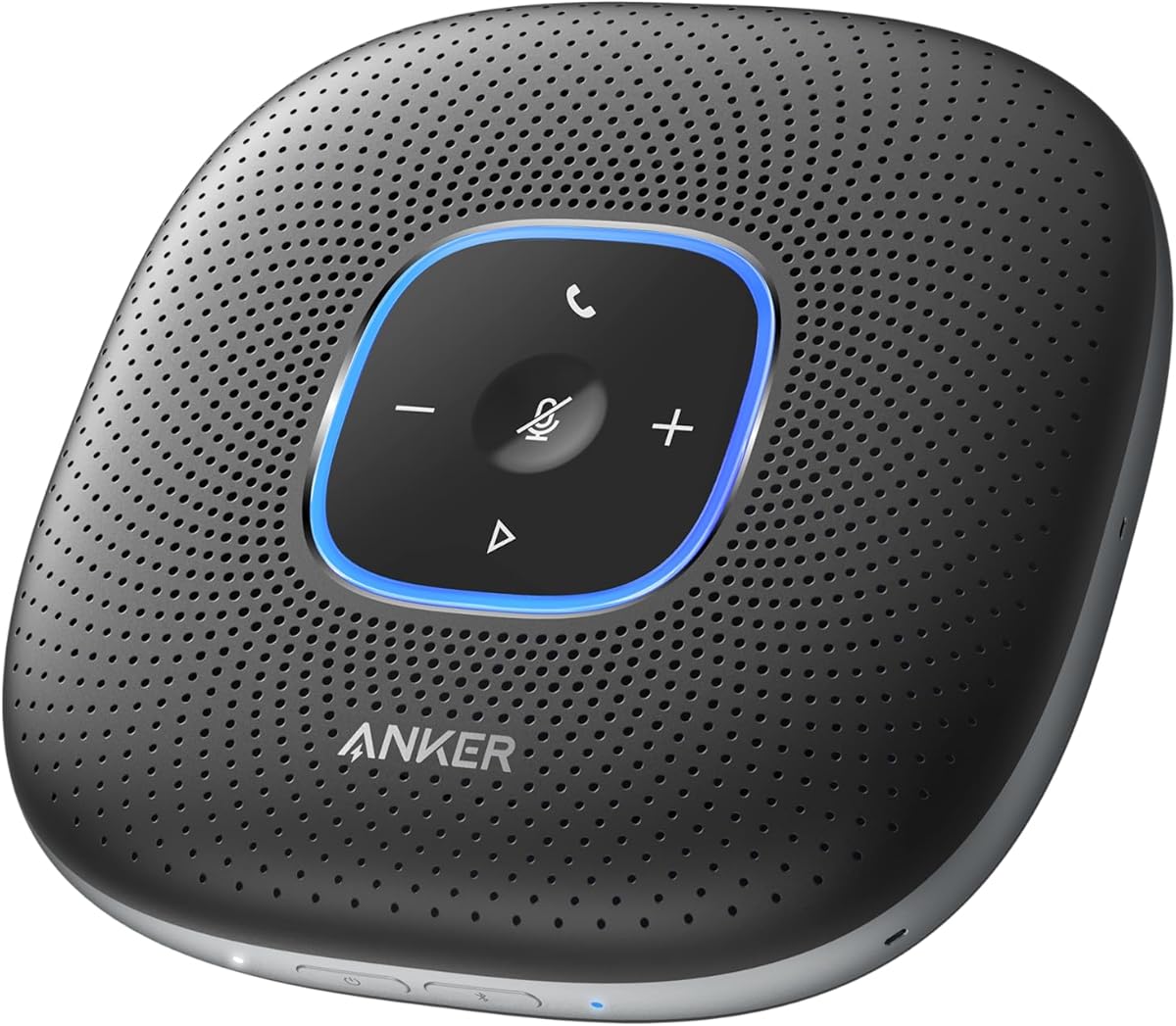
4.4Editor score

4.6Editor score
The following table provides a side-by-side comparison of all ten featured speakerphones. It highlights core specifications such as microphone count, battery life, and connectivity options to help you differentiate between models quickly.

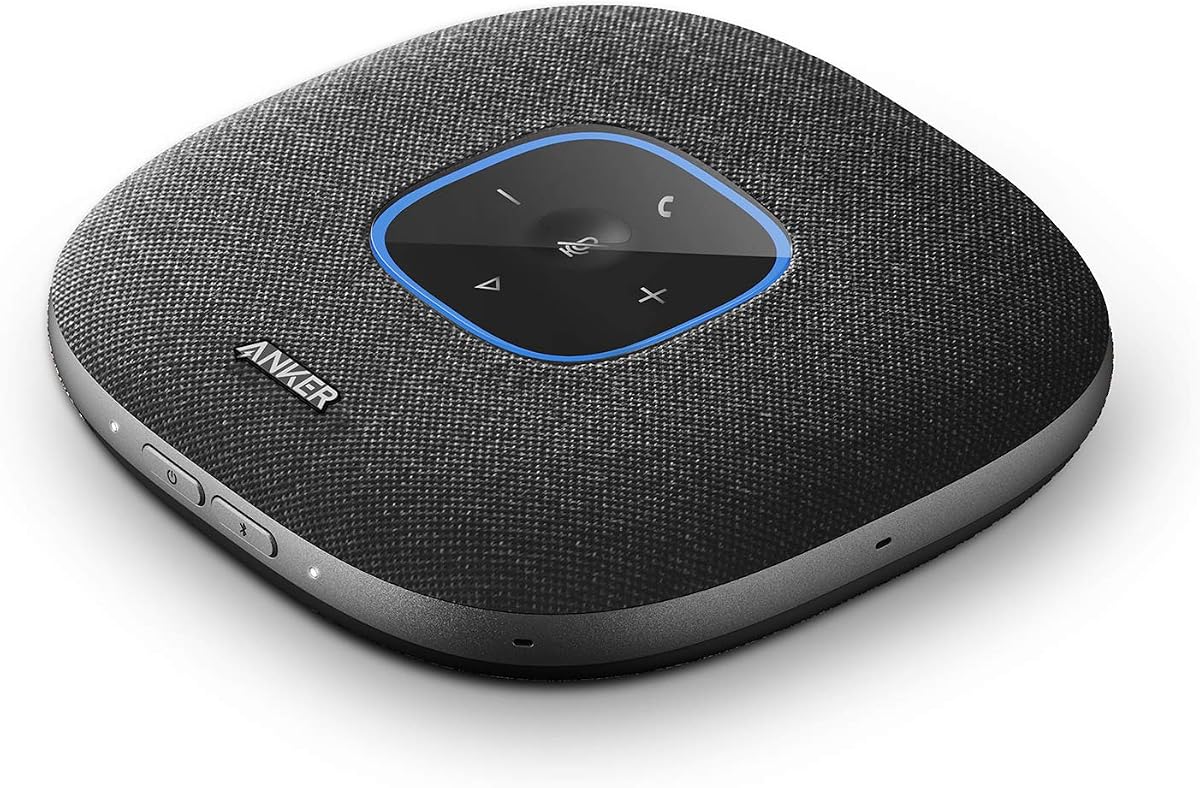


The Anker PowerConf Speakerphone stands out as a top choice for home offices requiring professional audio. It features six microphones arranged in a 360-degree array to ensure voices from all directions are captured clearly.
We may earn a commission when you buy through this link, at no additional cost to you.
Its Voice Radar 3.0 technology uses AI deep learning to reduce background noise and cancel echo effectively. This ensures your voice remains balanced and clear even if you move around the room during meetings.
While the device is robust, its size might be a consideration for smaller desks. However, the inclusion of a high-capacity battery allows for wireless use without frequent recharging interruptions.
This speakerphone is ideal for users who prioritize call clarity and platform compatibility. It is Zoom certified and works seamlessly with popular conferencing tools, making it a reliable addition to your setup.
The AI-driven noise reduction actively filters out distractions like keyboard typing or air conditioning hums for focused calls.
You can connect via Bluetooth to mobile devices or use a USB-C cable for a stable wired link to your computer.
We may earn a commission when you buy through this link, at no additional cost to you.
The Anker PowerConf S330 is designed specifically for users who prefer a direct wired connection for their meetings. It offers a straightforward plug-and-play experience without the need for driver installations.
We may earn a commission when you buy through this link, at no additional cost to you.
Featuring four high-sensitivity microphones, it covers a 3-meter range with super-high clarity. The speaker driver and passive radiators add depth to audio, making music playback sound rich during breaks.
This model lacks a built-in battery, which means it relies entirely on your computer or power source. This design choice ensures consistent performance without worrying about charging cycles.
It is best suited for stationary office setups where mobility is not a primary concern. The smart voice enhancement helps maintain a professional tone by eliminating background noise automatically.
The USB-C connection ensures uninterrupted audio streams, making it perfect for long daily conference sessions.
Background noise is actively removed while voices are enhanced to ensure you sound clear to all meeting participants.
We may earn a commission when you buy through this link, at no additional cost to you.
The Anker PowerConf S3 offers an impressive twenty-four-hour battery life, making it suitable for heavy users with back-to-back meetings. It utilizes a customized DSP algorithm for real-time voice optimization and noise reduction.
We may earn a commission when you buy through this link, at no additional cost to you.
Its six-microphone array ensures 360-degree voice pickup, allowing you to walk around while staying connected. The double talk feature prevents words from being skipped when multiple people speak simultaneously.
While the app provides useful controls, some users might prefer hardware buttons for quick adjustments. The automatic volume balancing helps manage differences in distance from the device during casual conversations.
This speakerphone is an excellent choice for those who need reliability and long battery endurance. It supports all major conferencing platforms and connects easily via Bluetooth or USB-C.
With up to 24 hours of call time on a single charge, you can go days without needing to recharge the device.
The double talk capability ensures that every word is heard clearly, even when multiple participants talk at once.
We may earn a commission when you buy through this link, at no additional cost to you.
The Jabra Speak 510 is a trusted device for portable conferencing, offering crystal-clear audio for meetings on the go. Its design prioritizes ease of use, allowing you to set up in seconds without technical hurdles.
We may earn a commission when you buy through this link, at no additional cost to you.
You can connect via Bluetooth or USB, giving you flexibility to pair with laptops or smartphones effortlessly. The HD Voice capability ensures conversations remain sharp and professional across different environments.
While it is a simpler device compared to newer models, its reliability makes it a strong contender. It works with all online meeting platforms, ensuring you can join calls from virtually any device.
This speakerphone is ideal for frequent travelers or those with limited desk space. The lightweight build and straightforward operation make it a hassle-free tool for maintaining productivity away from the office.
The portable form factor ensures you can carry high-quality audio wherever you travel without adding bulk.
Whether using Bluetooth or USB, the connection process is simple and allows for quick transitions between devices.
We may earn a commission when you buy through this link, at no additional cost to you.
The Yealink Sp92 delivers exceptional audio quality at an accessible price point for small meeting rooms. It features real-time AI noise cancellation that filters over 1,000 noise types for accurate speech reproduction.
We may earn a commission when you buy through this link, at no additional cost to you.
Equipped with an omnidirectional mic and 50mm speaker, it provides clear audio pickup within a 13-foot radius. The built-in full-duplex microphones support natural multi-person conversations without interruption.
While it offers a wide range of features, the sound quality may vary slightly compared to premium models. However, the included carrying case and solid battery life make it a practical choice for daily use.
This speakerphone is perfect for teams looking for certified compatibility without breaking the budget. It runs seamlessly on major platforms like Windows and macOS, ensuring broad usability.
AI noise cancellation actively identifies and suppresses ambient sounds to keep your call environment distraction free.
Microsoft Teams certification ensures optimized performance and reliability when using the Teams platform for meetings.
We may earn a commission when you buy through this link, at no additional cost to you.
The Lenovo Speakerphone is engineered for enterprise-grade performance with eight intelligent beamforming microphones. It prioritizes voices using AI noise cancellation to deliver clear, professional sound in noisy environments.
We may earn a commission when you buy through this link, at no additional cost to you.
Featuring a 50mm speaker driver and full duplex audio, it enables natural simultaneous speaking and listening. This ensures smooth, interruption-free conversations that are crucial for collaborative meetings.
The device offers flexible connectivity with dual Bluetooth support to connect two devices at once. Its IP54 rating provides resistance against dust and splashes, making it suitable for various workspaces.
It is an excellent choice for professionals who travel or work in hybrid settings. The dedicated Teams button and carrying case enhance usability and convenience during daily commutes or business trips.
Eight microphones focus on human voices and filter out background distractions to ensure your speech is always heard.
Pair with two devices simultaneously to switch seamlessly between your laptop and phone without re-pairing.
We may earn a commission when you buy through this link, at no additional cost to you.
The Jabra Speak2 55 is fully compatible with Microsoft Teams, offering seamless integration for enterprise users. Its four beamforming microphones pick up sound from all directions, ensuring you are heard clearly regardless of position.
We may earn a commission when you buy through this link, at no additional cost to you.
The voice level normalization feature equalizes surrounding voices, so everyone in the room sounds consistent. With a 30-meter Bluetooth range, you have the freedom to move while staying connected to your meeting.
While the battery life is solid at twelve hours, it may not last a full day of heavy use without charging. The inclusion of a USB-C charging adaptor ensures you can power up quickly when needed.
This speakerphone is ideal for organizations deeply invested in the Microsoft ecosystem. The 2-year warranty and carry pouch add value and protection, making it a reliable long-term investment.
Fully compatible with Microsoft Teams ensures optimized features and reliable call control for enterprise environments.
A 30-meter Bluetooth range gives you the flexibility to walk around your home or office during calls.
We may earn a commission when you buy through this link, at no additional cost to you.
The Jabra Speak 510 MS is tailored for users relying on legacy systems like Microsoft Lync and Office Communicator. It supports conference calls via both Bluetooth and USB, ensuring versatile connectivity options.
We may earn a commission when you buy through this link, at no additional cost to you.
With HD Voice capabilities, it provides high-definition sound quality that enhances the clarity of your conversations. The device offers up to fifteen hours of talk time, which is sufficient for most workdays.
While newer models offer more advanced features, this unit maintains a strong reputation for durability. The long standby time ensures it is always ready for use when needed without frequent charging.
It is a reliable choice for businesses transitioning to newer platforms or maintaining existing setups. The ability to connect to PC, tablet, or smartphone makes it a versatile tool for various devices.
HD Voice ensures conversations are clear and natural, making remote interactions feel more personal and professional.
Connect seamlessly to your PC, tablet, or smartphone for flexible access to your conference calls anywhere.
We may earn a commission when you buy through this link, at no additional cost to you.
The Jabra Speak 710 UC features immersive sound that elevates both calls and music listening experiences. Its omnidirectional microphone provides in-room coverage for up to six people, making meetings more efficient.
We may earn a commission when you buy through this link, at no additional cost to you.
The device is lightweight and comes with a protective travel pouch, ideal for those who travel frequently. Setup is intuitive with plug-and-play connectivity via USB or Bluetooth, requiring no IT assistance.
Despite its premium price, the sound quality and certification for major platforms justify the investment. It works with various platforms including GoTo Meeting and Skype, offering broad utility for different teams.
This speakerphone is best for users who prioritize audio fidelity and portability. The 2-year warranty included adds peace of mind, ensuring long-term reliability for your professional communication needs.
The speaker delivers rich sound that enhances meetings, making voices feel present and engaging for all participants.
A protective travel pouch and lightweight body make it easy to take meetings anywhere without worry.
We may earn a commission when you buy through this link, at no additional cost to you.
The Yamaha YVC-330 utilizes SoundCap technology to eliminate background noise outside a 3-foot range effectively. Its three unidirectional microphones focus on human voice activity to ensure clarity during conferences.
We may earn a commission when you buy through this link, at no additional cost to you.
The built-in self-silence feature mutes the microphone when participants are not speaking, reducing unnecessary noise. This helps maintain a professional environment by preventing background chatter from interrupting the meeting.
Connectivity is flexible with USB 3.0, NFC, or Bluetooth options for various devices. The device works with all major conferencing tools, ensuring you can join meetings from different systems seamlessly.
This speakerphone is ideal for users needing advanced noise isolation capabilities. While it comes at a higher price point, the technology ensures superior call quality in challenging acoustic environments.
Built-in far-field noise reduction actively eliminates external sounds to focus purely on meeting participants.
Self-silence technology mutes the mic during silence to prevent background noises from disrupting calls.
We may earn a commission when you buy through this link, at no additional cost to you.
Selecting the right speakerphone involves evaluating audio quality, connectivity, and durability. This guide breaks down key factors to consider when making your purchase.
Look for speakerphones with multiple microphones or beamforming technology to capture voices clearly from all angles. A 360-degree coverage ensures no one is missed regardless of their seating position.
Prioritize models with strong noise cancellation to filter out ambient sounds like typing or fans.
Ensure the device supports both Bluetooth and USB connections to maximize flexibility with your laptops and phones. Dual Bluetooth capability allows you to switch between devices easily.
Check if the speakerphone includes necessary adapters for your specific ports.
For mobile use, a long-lasting battery is crucial to avoid interruptions during meetings. Aim for models offering at least 12 to 24 hours of talk time.
Consider recharge times and whether the device supports USB charging while in use.
Certified devices for platforms like Teams or Zoom guarantee optimized performance and features. This ensures seamless integration with your existing workflow.
Check for compatibility with other tools you use regularly such as Google Meet or Webex.
If you travel often, look for lightweight designs with carrying cases. IP ratings can also indicate resistance to dust and water for better durability.
A compact footprint ensures the device does not clutter your desk space unnecessarily.
High-quality speakers with balanced bass and treble improve the overall experience for calls and music. Full duplex audio allows simultaneous speaking and listening without echo.
Sound enhancement features help maintain clarity even in noisy environments.
Plug-and-play functionality eliminates the need for complex driver installations. Simple LED indicators for mute status help manage calls intuitively.
A user-friendly interface reduces the learning curve for new users.
Balance your budget with the features you need most. Higher-end models often offer better sound and durability but may cost more.
A multi-year warranty adds value by protecting your investment against defects.
To start using your speakerphone, place it centrally in the room where all participants are seated. This ensures equal microphone coverage and optimal sound pickup for everyone.
Connect the device to your computer or phone via USB or Bluetooth. Verify that the audio settings are configured to use the speakerphone for both input and output.
Regularly clean the microphones and speaker grills with a soft cloth to maintain audio quality. Keep the device dry and away from direct sunlight to preserve battery health and build materials.
Bluetooth offers wireless convenience for mobile devices while USB provides a stable wired connection. Both methods ensure high-quality audio, but USB is often preferred for long meetings to avoid battery drain.
Yes, most modern speakerphones are compatible with both operating systems. They function as standard USB audio devices or pair via Bluetooth without requiring special drivers.
Most devices have a physical mute button with an LED indicator. Alternatively, you can mute through your conferencing software interface directly from your computer.
Many premium models support dual Bluetooth connections allowing you to switch between devices easily. This is useful for alternating between a laptop and a mobile phone during calls.
Noise cancellation is highly beneficial in shared spaces to filter out distractions. It ensures your voice remains clear without background interference like pets or traffic.
Avoid leaving the device plugged in constantly after it reaches full charge. Store it in a cool, dry place and recharge it regularly to maintain battery health over time.
Most models support Zoom, Teams, Google Meet, and Webex. Always check the product description for specific certifications before purchasing to ensure compatibility with your tools.
Keep the microphones and speaker openings clean to prevent dust buildup. Use the included carrying case when transporting to protect the device from physical damage.
Our top picks include the Anker PowerConf Speakerphone for its balanced performance, the Yealink Sp92 for budget-conscious users, and the Jabra Speak 710 UC for premium audio quality.
Prioritize features like microphone range and platform certification that align with your meeting habits. A device that fits your specific workflow will enhance your remote communication effectiveness.
Please note that product details and availability may change. Verify current listings and specifications before making your purchase to ensure you get the best value.