
SUNLU Filament Dryer Box 2026
4.3Editor score
Fast drying with built-in fan design
Visual LCD display for monitoring
Compatible with most filament types
Compare the top 10 filament dryer box options for 2026 to find the best moisture control solution for your 3D printing setup and print quality needs.
Filament dryer boxes are essential tools for maintaining print quality by removing moisture from spools. These devices prevent issues like stringing, clogging, and poor adhesion that plague damp materials during printing sessions.
We compared ten leading models based on capacity, heating technology, temperature range, and ease of use. Our analysis focuses on real-world performance and compatibility with common 3D printing filaments across various environments.
Each pick highlights key strengths and ideal user scenarios to help you choose the right dryer for your needs. Please note that product availability and pricing may change frequently, so verify details before purchasing.
4.3Editor score

4.6Editor score

4.6Editor score
The following table provides a side-by-side comparison of the top ten filament dryer box models available this year. Reviewing these specifications helps identify the right balance of capacity, features, and value for your specific printing requirements.


This Creality space Pi X4 dryer stands out as the top choice for serious print enthusiasts due to its massive capacity and powerful dual heating chambers. With a 4.6 rating, it delivers exceptional moisture removal for engineering filaments that need higher temperatures.
We may earn a commission when you buy through this link, at no additional cost to you.
The dual independent heating chambers allow you to dry two types of filament at different temperatures simultaneously, cutting drying time by 30 percent compared to single chamber units. The touch UI provides precise control ranging from 50 to 85 degrees Celsius for various material needs.
While it costs more than basic dryers, the ability to store and dry four spools at once justifies the investment for high volume users. The silicone sealed enclosure prevents moisture reabsorption even when printing pauses, ensuring consistent results over long sessions.
Users managing multiple printers or using high performance materials like PAHT and PC should prioritize this model. It offers the best balance of speed, capacity, and advanced temperature control available on the market today for professional environments.
Independent PTC heaters allow simultaneous drying of different materials at their optimal temperatures without compromise.
Reaching up to 85 degrees Celsius unlocks support for advanced engineering filaments that standard dryers cannot handle.
We may earn a commission when you buy through this link, at no additional cost to you.
The SUNLU S1 Plus offers an excellent entry point for those new to filament drying with its affordable price and reliable performance. A 4.3 rating reflects its ability to solve common issues like stringing and clogging without a major financial commitment.
We may earn a commission when you buy through this link, at no additional cost to you.
Its upgraded fan design accelerates the discharge of excess water from filaments significantly faster than passive units. The visual display allows precise monitoring of time and temperature settings making it simple to adjust for PLA PETG or ABS materials.
The 55 degree Celsius limit suits most standard plastics but may fall short for high temp engineering materials. The 210 by 89 millimeter height capacity works for many standard spools though taller bundles might not fit inside easily.
Home users and hobbyists looking for cost effective moisture protection will find this box delivers solid value. It provides essential drying features in a compact form factor that fits neatly into most desktop printing workspaces.
Integrated fan circulation reduces drying time compared to traditional static heater boxes by expelling moisture efficiently.
Simple button controls and an LCD screen make temperature adjustments intuitive even for beginners.
We may earn a commission when you buy through this link, at no additional cost to you.
This official Creality model is built for power users who need to dry and print from multiple spools at once. Its 4.6 rating highlights its robust build quality and ability to maintain consistent temperatures for sensitive engineering filaments.
We may earn a commission when you buy through this link, at no additional cost to you.
Eight filament holes with PTFE tubing allow direct feeding to four different printers simultaneously without moving spools. The dual chambers enable energy saving modes where only one heater runs when full capacity is not needed reducing overall power consumption.
Users should ensure they use the compatible heat resistant plastic trays for best performance as noted in the product guidelines. This ecosystem approach ensures the heating is directed efficiently to the filament rather than the empty space.
Workshops with multiple machines benefit most from this multi output design allowing a queue of different materials ready at all times. It represents the premium end of drying where throughput and energy efficiency are prioritized over simple storage.
Multiple PTFE tubes support simultaneous printing from different spools in different locations without manual swapping.
Single chamber operation reduces energy use by up to 40 percent when drying only one type of filament.
We may earn a commission when you buy through this link, at no additional cost to you.
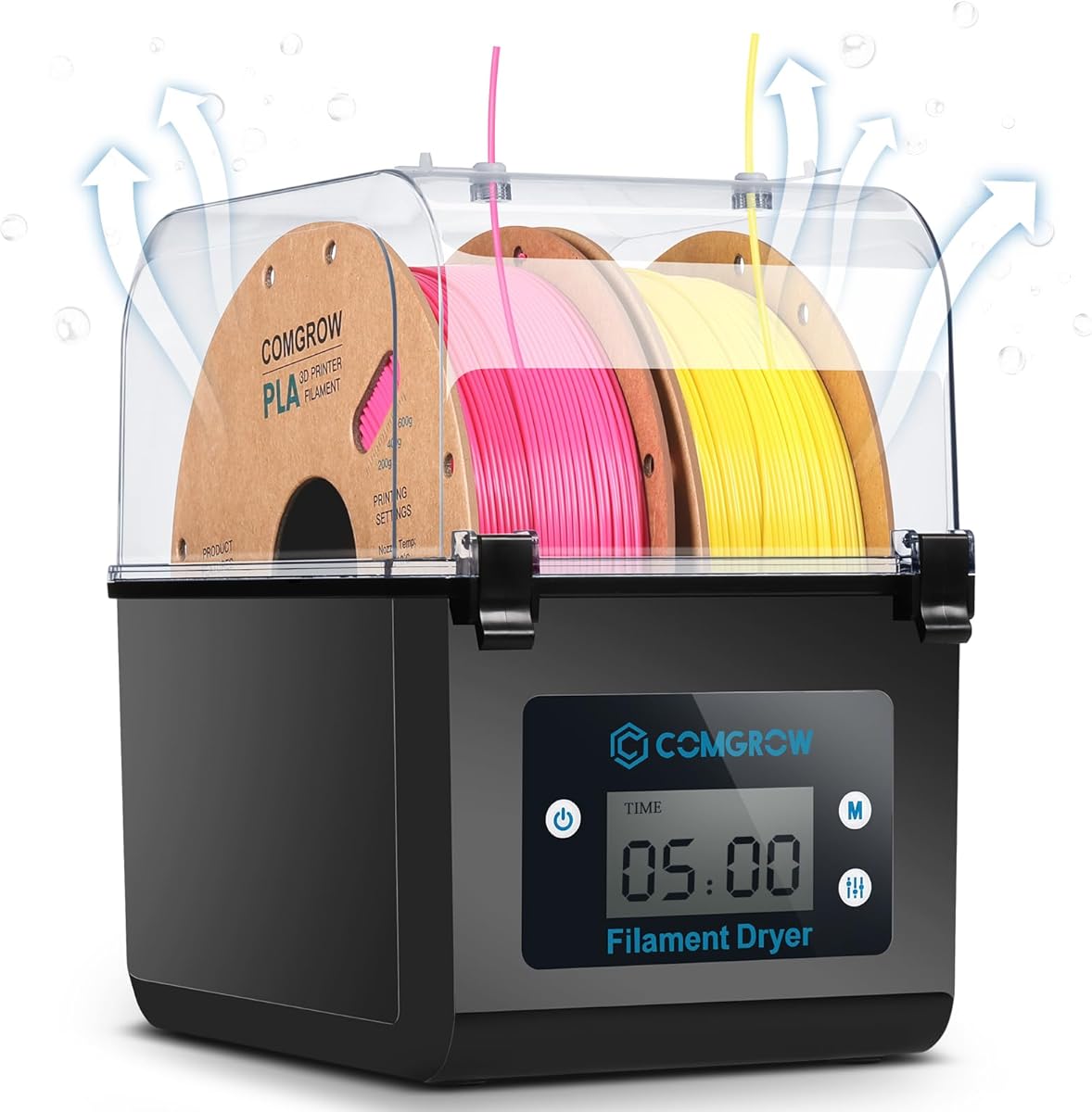
The Comgrow SH01 is a solid mid range option that balances capacity and cost for typical desktop printers. With a 4.4 rating, it effectively prevents moisture issues for PLA ABS and PETG while keeping the setup simple to manage.
We may earn a commission when you buy through this link, at no additional cost to you.
Its large storage volume fits two standard 1kg spools side by side which is useful for those printing long batches. The real-time monitoring via 2 inch LCD screen ensures you can track temperature and humidity levels throughout the drying process.
The sealed outlet design uses silicone sheaths to keep moisture out while allowing filament to feed smoothly. This attention to sealing details helps maintain dry conditions even when the machine is not actively heating during breaks.
This model suits users who need to dry more than one spool at a time without needing high temperature engineering support. It is a reliable workhorse for standard materials that require consistent moisture control over days.
Internal dimensions allow two full 1kg spools to be stored and dried simultaneously without crowding.
Silicone cable sheaths and snap cover structures ensure the environment stays sealed during storage cycles.
We may earn a commission when you buy through this link, at no additional cost to you.
Polymaker takes a different approach with a passive storage box designed to keep filament dry using desiccants rather than heat. Its 4.4 rating shows that for storage between projects this method works well for preventing humidity reabsorption.
We may earn a commission when you buy through this link, at no additional cost to you.
The built-in hygrometer makes it easy to monitor storage conditions without guessing if your spools are safe. By sealing the enclosure tightly the unit locks out moisture from the air between prints and extends filament shelf life effectively.
Since it lacks active heating it is best used for maintenance drying or storing spools rather than reviving wet filament. You will need to replace desiccants periodically to maintain the desired dry environment inside the container.
This option is ideal for users who prioritize simplicity and low cost over rapid drying speeds. It provides consistent protection against humidity for long term storage and is a great companion to active dryers.
Relies on desiccant packs and sealed air to keep filaments dry without consuming electricity.
Visible hygrometer allows quick checks to ensure humidity levels remain low enough for safe storage.
We may earn a commission when you buy through this link, at no additional cost to you.
The SUNLU S2 distinguishes itself with a built-in spindle that rotates the filament for uniform drying. A 4.3 rating reflects its effectiveness in eliminating wet spots on the filament that static dryers sometimes leave behind.
We may earn a commission when you buy through this link, at no additional cost to you.
Large internal dimensions of 265 by 274 by 118mm make it compatible with many bulky or large diameter spools. The translucent lid allows users to check on the filament status without interrupting the drying cycle or opening the box.
With a max temperature of 70 degrees it handles a wide range of materials including ABS and PETG easily. The customization options for time and temperature provide flexibility for different environments and filament needs.
Printers who struggle with uneven quality from damp spools will appreciate the spinning action for consistent results. It is a robust choice for those who need high capacity and reliable heat distribution for daily printing tasks.
Built-in spindle rotates the spool to ensure all sides of the filament are exposed to heat evenly.
Spacious interior accommodates various spool sizes including larger bulk rolls that might not fit elsewhere.
We may earn a commission when you buy through this link, at no additional cost to you.
Comgrow SH02 improves on its predecessor with a faster heating 150W PTC heater and smart preset settings. A 4.4 rating highlights its quick warmup time and ease of use for users who need rapid drying turnaround.
We may earn a commission when you buy through this link, at no additional cost to you.
It reaches 50 degrees in just 7 minutes and 70 degrees in 25 minutes thanks to the efficient heater design. The one-key temperature setting simplifies operation by auto selecting correct times and temps for nine common filament types.
Multiple sealing rings on covers and outlets ensure moisture cannot leak back in during the drying process. Intelligent safety features like overheat cutoff protect the internal components and user from potential hazards during operation.
Users needing quick preparation for printing without manual dialing will find the presets very convenient. This dryer balances speed and convenience effectively for most common materials in a two spool format.
The 150W PTC heater heats the space quickly reducing wait time before starting a print job.
Built-in profiles for common filaments automate temperature and time settings with a single button press.
We may earn a commission when you buy through this link, at no additional cost to you.
This Creality model adds convenience with a large touch screen and presets for twelve different filament types including composites. A 4.4 rating shows it is well suited for users who switch between materials frequently and want simple settings.
We may earn a commission when you buy through this link, at no additional cost to you.
One-key settings automatically apply correct temperature and time for materials like PLA-CF or PA-CF which are tricky to set manually. The 3.7-inch display allows easy adjustment and switching between Celsius and Fahrenheit for any user preference.
A 48-hour timer ensures long drying runs can be set without worrying about manual shut down. The power-off memory function restores your last settings after an outage saving you from reconfiguring every time.
It is a versatile pick for users who print composites or specialty blends and need flexible temperature adjustments. The large interface and smart presets make complex filament management much easier for home studios.
Presets include specialized composites like carbon fiber blends that require specific temperatures for best results.
Long timers and power loss memory ensure your drying schedule is maintained without constant intervention.
We may earn a commission when you buy through this link, at no additional cost to you.
The Space PI Plus adds a real-time humidity monitor to the standard features allowing precise tracking of drying progress. A 4.4 rating confirms its utility for users who want visibility into conditions inside the box while it operates.
We may earn a commission when you buy through this link, at no additional cost to you.
It shares the touch screen and preset functionality of the standard PI model but adds environmental tracking for better control. The dual spool capacity allows drying two spools at once for a balanced approach to volume and features.
Adjustable temperature from 45 to 70 degrees covers most common materials while the humidity display gives peace of mind. This extra layer of data helps prevent under drying or over drying by showing exact moisture levels.
Printers who care about exact humidity conditions will value this monitor integration for consistent quality. It is a smart middle ground between basic storage and high volume dryers with detailed feedback capabilities.
Real-time humidity display provides immediate feedback on drying progress and moisture levels inside the box.
Twelve preset options simplify temperature selection for a wide variety of filaments and composites.
We may earn a commission when you buy through this link, at no additional cost to you.
This X4L variant offers generous capacity with four spools and dual heating chambers for fast drying of standard filaments. A 4.5 rating indicates strong performance in removing moisture quickly while keeping spools organized in one unit.
We may earn a commission when you buy through this link, at no additional cost to you.
The 200W chambers work independently to dry two types of filament faster than single units. The illuminated window allows you to check on spools without opening the box and disrupting humidity control inside.
While it reaches up to 75 degrees rather than 85 it still supports advanced materials like PC and ASA reliably. The sealed enclosure prevents moisture reabsorption ensuring prints remain consistent even when paused overnight.
High volume users who need multiple spools ready simultaneously will find this model offers excellent value. It balances capacity and performance well for those who print frequently and need reliable drying for various materials.
Holds four standard 1kg spools which reduces the need to constantly refill and dry new batches.
Visible window allows monitoring of spools without breaking the sealed environment or losing humidity control.
We may earn a commission when you buy through this link, at no additional cost to you.
Selecting the right filament dryer box depends on your printing habits, material choices, and workspace constraints. Below are key factors to evaluate when making your purchase.
Capacity varies from single spool to four or more depending on the model. If you print large batches or use multiple printers, a higher capacity unit like the Creality X4 series allows you to dry multiple spools at once. For hobbyists, two spool models provide a good balance of cost and utility.
Choose a capacity that matches your weekly printing volume to avoid bottlenecks.
Standard filaments like PLA and PETG dry well at 45 to 60 degrees Celsius. Engineering materials like PA and PC require higher temps up to 70 or 85 degrees. Check the max temp specification to ensure the dryer supports all the materials you plan to use.
Higher max temperatures unlock advanced materials but increase power usage.
PTC heaters are common and provide efficient, uniform heat compared to simple heating pads. Dual chamber systems divide the interior into separate zones allowing different temps simultaneously. Fan assisted models circulate air to dry spools faster than passive heat only designs.
Dual or fan assisted designs are recommended for faster results and better consistency.
Effective sealing prevents ambient humidity from entering during storage. Look for silicone seals on cable outlets and tight fitting covers. Some boxes include hygrometers to monitor internal humidity levels which adds confidence to the drying process.
Sealed units ensure spools stay dry even between printing sessions.
Interfaces range from simple buttons to large touch screens with presets. One-key presets for different filament types simplify operation for beginners. Timers and memory functions save settings after power outages which is crucial for long drying runs.
Touch screens and presets reduce setup time and human error.
Ensure the box fits your spool dimensions including hub height and width. Some models require specific plastic trays for optimal heat transfer. Footprint matters for desktop setups; compact boxes are easier to integrate with existing printers.
Measure your spools and desk space before purchasing to ensure a proper fit.
Energy savings features like single chamber modes help reduce electricity costs. Models with timers allow you to stop heating once dry avoiding unnecessary runtime. Passive storage boxes require no power but rely on desiccants instead of heat.
Look for energy-saving modes if you dry frequently over long periods.
Budget models cost less but may lack advanced features like dual chambers or high temp support. Premium models justify their cost with speed capacity and material versatility. Consider your long-term needs to determine if a premium unit offers better value over time.
Invest more if you print engineering materials or high volumes regularly.
Start by checking your filament for dampness signs like bubbles or pops during printing. Set the appropriate temperature on the dryer screen for your material type either via preset or manual adjustment. Place spools inside ensuring they can rotate or sit without obstruction.
Allow the unit to run for the recommended time usually several hours for dry filament or overnight for wet spools. Monitor the display for temperature stability and ensure the sealing hole remains open during operation to let moisture escape. Close the hole when storing filament without drying.
Regularly clean the interior and check cable outlets for blockages to maintain airflow. Replace desiccants if your model supports passive drying or clean filters if fans are included. Always let the unit cool before moving or storing spools to prevent accidental burns or damage.
Yes especially for materials like Nylon, TPU, and PETG that absorb moisture quickly. Wet filament causes stringing, poor layer adhesion, and rough surfaces. A dryer box solves these issues by removing water before and during prints for consistent quality.
Drying time depends on moisture levels and material type. Usually 4 to 12 hours is sufficient for spools left in humid environments. Very wet spools may need 24 hours. Check the box display or test print to confirm dryness before starting.
Most dryer boxes are brand agnostic since they feed filament through PTFE tubing to the extruder. Ensure the outlet height and position align with your printer's extruder. Compatibility is broad across FDM printers from different manufacturers.
PLA typically dries well between 45 and 55 degrees Celsius. Higher temperatures may warp the filament or affect its chemical structure. Always consult the filament manufacturer guidelines and start with lower settings to avoid degradation.
Many models are designed to feed filament directly while printing which keeps the spool dry during long prints. This is essential in humid environments where ambient air can moisten filament between layers. Verify the box supports printing mode before setup.
Most modern units include overheat protection and automatic shut-offs for safety. PTC heaters are generally stable and efficient. However avoid leaving them unattended for extended periods without monitoring especially if using custom settings or older models.
We highlighted top performers like the Creality X4 for volume, the SUNLU S1 Plus for budget, and the official X4 for premium setups. Each offers distinct advantages depending on your printing needs and material diversity.
Prioritize capacity and temperature range that match your most frequent materials. If you work with engineering filaments ensure your box reaches at least 70 degrees. For hobbyists standard ranges often suffice with cost savings.
Remember to check current availability and verify compatibility with your printer before buying. Regular maintenance of the dryer ensures long-term reliability and consistent print quality for all your projects.