
VOYEE PC Controller
4.3Editor score
Compatible with Windows 11
Ergonomic design for long sessions
Rumble feedback for immersion
Discover the top joysticks for Windows 11 gaming. This guide compares flight sim, racing, and general controllers for immersive precision and comfort.
Finding the right joystick for Windows 11 can transform your gaming experience from flat to immersive. Whether you fly combat jets or farm virtual tractors, the right controller offers precision that keyboards cannot match.
We evaluated ten top-rated controllers based on compatibility, build quality, and feature sets. Our analysis focuses on models that work seamlessly with modern operating systems and popular simulation titles available today.
Each pick highlights specific strengths like ergonomic design or programmable buttons. Keep in mind that availability and pricing can shift quickly, so check current listings before making your final decision.
4.3Editor score

4.4Editor score

4.0Editor score
This side-by-side comparison highlights key specifications for each joystick. Use this table to quickly identify which model fits your specific gaming needs and budget constraints.






The Thrustmaster T.16000M FCS stands out as a top choice for serious flight simulation enthusiasts. It holds a solid rating for its precision and durability in competitive environments.
We may earn a commission when you buy through this link, at no additional cost to you.
Its H.E.A.R.T technology ensures that your inputs are registered accurately without drift over time. The ambidextrous design allows both left and right-handed pilots to find a comfortable grip.
While it offers excellent performance, it does require some setup time to map buttons properly. The learning curve is worth it for the level of control you gain.
This model is ideal for users who want a professional-grade experience on Windows 11. It balances advanced features with a reasonable form factor for most desks.
H.E.A.R.T technology uses magnetic sensors to detect movement without physical contact, preventing wear and tear on the internal components.
The T.A.R.G.E.T software allows you to save specific profiles for different games, making switching between simulations seamless.
We may earn a commission when you buy through this link, at no additional cost to you.
The VOYEE PC Controller is an excellent entry point for casual gamers looking for a controller without breaking the bank. It is widely compatible with Windows 11 systems.
We may earn a commission when you buy through this link, at no additional cost to you.
It features upgraded triggers and sensitive buttons that respond quickly to player commands. The ergonomic design ensures you can hold it comfortably for long gaming sessions.
However, it is not a dedicated flight stick so it may lack the specific axes needed for advanced simulation. This makes it better for general gaming or simpler flight titles.
For those on a tight budget, this controller offers great value. It provides reliable performance for everyday use without complex configuration requirements.
The contours of the grips are designed to fit your hands more comfortably, reducing fatigue during extended gameplay periods.
While it works well on PC, it is also compatible with Xbox 360 systems providing flexibility for console owners too.
We may earn a commission when you buy through this link, at no additional cost to you.
The Logitech G X56 H.O.T.A.S is a powerhouse for users who demand maximum customization and control. It is designed for serious flight simulation scenarios.
We may earn a commission when you buy through this link, at no additional cost to you.
With over 189 programmable controls, you can map almost every function in your game directly to the controller. This eliminates the need to reach for a keyboard.
The RGB lighting adds a visual flair to your setup and helps identify buttons in dim environments. The spring force system allows you to adjust resistance to your liking.
Due to its size and cost, this unit is best suited for dedicated battle stations. It delivers an unmatched experience for professional simulation enthusiasts.
You can adjust the spring force on the stick to match different aircraft types, enhancing realism in your flight training.
Use the software to set the color of the lighting to match the rest of your gaming rig for a cohesive look.
We may earn a commission when you buy through this link, at no additional cost to you.
The PXN 2113PRO offers a dedicated flight stick experience at a very accessible price point. It is designed specifically for Windows PC users.
We may earn a commission when you buy through this link, at no additional cost to you.
It features a vibration switch that you can toggle to feel impacts during your flights. The suction cups at the bottom help keep the device stable on smooth surfaces.
While it has many buttons, the software may require some tweaking to get the best performance. Some users might find the build quality feels a bit light.
This model is a good starting point for hobbyists who want a flight stick without a huge investment. It covers most major simulation titles well.
Ensure the vibration strength is set high enough in the driver to feel the feedback during intense gameplay moments.
The four power-grip suction cups help fix the joystick firmly on your table so it does not slide during use.
We may earn a commission when you buy through this link, at no additional cost to you.
The Thrustmaster T-Flight Hotas One provides a modular flight experience that adapts to your space. It is built for realistic flight simulator control.
We may earn a commission when you buy through this link, at no additional cost to you.
You can use the stick and throttle together or separately depending on your seating arrangement. The adjustable resistance adds a layer of realism to the feel.
It requires no complex setup and works seamlessly with most popular flight sim software. This convenience makes it a favorite for casual players.
This controller is perfect if you want a balance between portability and function. It delivers solid performance across various aircraft categories.
The detachable throttle allows you to use the stick on your lap while keeping the throttle on your desk.
Ergonomic placement of buttons ensures you can reach all controls easily during critical maneuvers.
We may earn a commission when you buy through this link, at no additional cost to you.
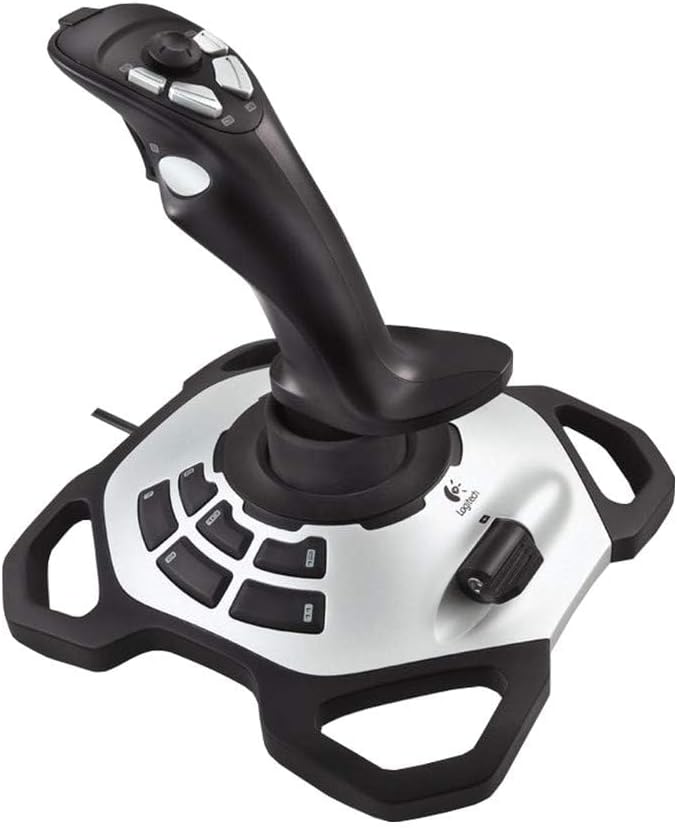
The Logitech Extreme 3D Pro is a well-known name in the simulation community for its reliability. It offers a classic flight stick experience.
We may earn a commission when you buy through this link, at no additional cost to you.
Its design focuses on precision and comfort which are essential for long simulation sessions. The grip is shaped to fit naturally in your hand.
While it is an older model it still holds up well against newer options. It is a great choice if you prefer simplicity over complex electronics.
This stick is ideal for enthusiasts who value build quality. It provides a stable platform for various flight training exercises.
Logitech has a strong reputation for durable peripherals that last for years without losing calibration.
The straightforward layout means there is less software overhead to deal with before you start flying.
We may earn a commission when you buy through this link, at no additional cost to you.
The Microsoft Sidewinder Precision 2 brings a classic feel to modern gaming with its robust design. It offers a rotating handle for precise rudder control.
We may earn a commission when you buy through this link, at no additional cost to you.
You can save and download programmed game commands into game-specific controller profiles. This feature makes switching between different flight models easier.
The 146 degree action throttle gives you complete control from the joystick itself. It is designed for users who prefer all-in-one solutions.
While it may be harder to find today it remains a solid option for those who appreciate it feel. It delivers consistent performance for flight sims.
The rotating handle gives precise rudder control without needing separate foot pedals.
Save your preferred settings for specific aircraft so you do not have to reset every time.
We may earn a commission when you buy through this link, at no additional cost to you.
The Thrustmaster USB Joystick is an entry-level option designed for ease of use. It features a point of view button for instant camera control.
We may earn a commission when you buy through this link, at no additional cost to you.
With three axes and four buttons it provides complete control for basic flight actions. The ergonomic handle offers optimal gaming comfort.
It is not packed with advanced features but it gets the job done for simple titles. The plug and play nature makes it user-friendly.
This unit is suitable for beginners who want to try flight sims without complexity. It offers a reliable introduction to stick-based gaming.
The Point-Of-View Button offers easy camera control and perfect immersion in games during critical moments.
The ergonomic handle with enlarged rest ensures your hand is supported properly.
We may earn a commission when you buy through this link, at no additional cost to you.
The V-one Wired USB Controller supports multiple platforms including Windows and Android. It is a versatile option for users with various devices.
We may earn a commission when you buy through this link, at no additional cost to you.
It features a vibration feedback function and turbo mode for enhanced gaming. No drivers are needed for most systems making it very convenient.
While it is a gamepad rather than a flight stick it can still be used for compatible titles. It supports Xinput and Dinput modes for compatibility.
This controller is great for mobile gamers who also use a PC. It offers a low-friction experience across different operating systems.
It supports PC, Android, and PS3 making it a flexible choice for users with multiple gaming rigs.
The plug and play functionality means you can start playing immediately after connecting via USB.
We may earn a commission when you buy through this link, at no additional cost to you.
The Thrustmaster SimTask FarmStick is designed specifically for heavy machinery simulation. It uses Hall effect sensors to eliminate drift and wear.
We may earn a commission when you buy through this link, at no additional cost to you.
It features up to 33 programmable inputs so you can manage every function without relying on a keyboard. The ambidextrous design suits any hand position.
This model is ideal for serious farming simulator players who need precision. It offers a lifelike control experience for operating tractors and loaders.
While it is specialized it delivers unmatched performance for its intended audience. It transforms the way you interact with farming and construction games.
H.E.A.R.T technology ensures ultra-accurate performance and long-term precision for demanding gameplay.
Buttons and thumbwheels allow you to access complex machinery functions without breaking immersion.
We may earn a commission when you buy through this link, at no additional cost to you.
Selecting the right controller depends on what you play and how you play. Here are key factors to consider when browsing options.
Ensure the controller explicitly supports Windows 11. Most modern USB devices work but older models might require drivers or lack full support.
Check for compatibility with your specific games to avoid mapping issues.
Flight sticks differ from general gamepads. If you fly aircraft you need multiple axes and programmable buttons. For racing or farming look for specific dedicated sticks.
Match the device to your primary gaming genre for the best results.
Look for durable materials and robust joints. Metal components often last longer than plastic ones during heavy use.
A solid build ensures consistent performance over years of gameplay.
More buttons mean more control. Choose a device that allows you to map functions to your specific needs without software complexity.
Look for software that lets you save profiles for different titles.
Your hand should rest comfortably on the grip. A device that causes strain will limit your sessions and reduce enjoyment.
Test the grip shape if possible or read reviews on comfort.
USB is standard but wireless options exist. Ensure the connection method does not introduce lag or require proprietary dongles.
Wired connections often offer the most reliable performance.
Higher price does not always mean better. Determine which features are essential for your use case and find the best value in that range.
Avoid overspending on unnecessary features you will not use.
Always plug in your joystick before launching your game. This ensures the system recognizes the hardware correctly and loads the default driver settings.
Use the included software to map buttons to your most frequent actions. This customization significantly enhances your gameplay speed and accuracy.
Keep the device clean by dusting it regularly. Avoid placing it near liquids or heavy objects that could damage the internal sensors.
Yes most models in this list explicitly support Windows 11. Always check the product specifications to confirm compatibility before purchasing.
Many modern sticks are plug and play. However some advanced units require drivers for full functionality so check the manual upon arrival.
You can map flight stick buttons to general games but it may not be optimized. It works best with simulation titles that support custom mapping.
This technology uses magnetic sensors to track stick movement. It prevents physical wear and ensures long term precision without drifting.
Some units come with a dedicated throttle module while others integrate it into the stick. Decide based on whether you need independent control.
Many sticks have an ambidextrous design allowing setup for left handed users. Check the product description for specific ambidextrous options.
We have reviewed ten top contenders ranging from budget friendly sticks to premium flight rigs. Each offers unique benefits depending on your gaming style and needs.
Prioritize comfort and feature count when making your choice. A controller that feels right in your hand will improve your experience far more than specs alone.
Prices and availability change regularly so verify current listings before buying. We hope this guide helps you find the perfect flight or gaming companion.