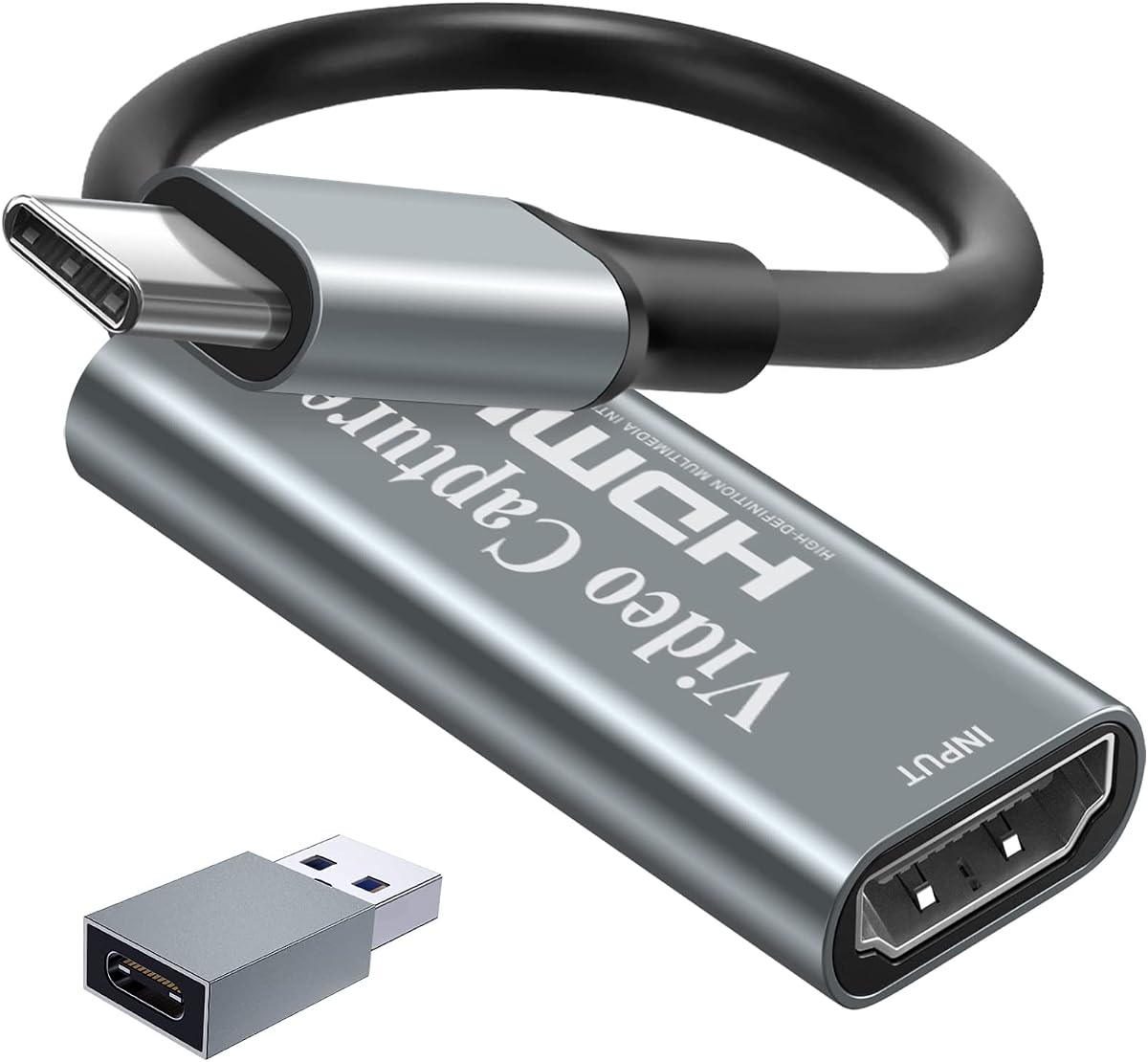
Papeaso Video Capture Card
4.2Editor score
1080P 60FPS Recording
Linux Compatible
Plug and Play
This comprehensive guide compares the top capture cards for Linux systems, evaluating compatibility, performance, and features to help you choose the right
Finding a reliable capture card for Linux can be challenging due to driver limitations and hardware compatibility issues. This guide explores the best options available that work seamlessly with open-source operating systems and popular streaming software like OBS.
We analyzed ten top-rated capture cards based on user reviews, technical specifications, and real-world performance on Linux distributions. Each product was evaluated for plug-and-play functionality, resolution support, and audio-video synchronization capabilities to ensure a smooth experience.
Each section details the strengths and weaknesses of the selected products, helping you make an informed decision. Please note that prices and availability may change over time, so verify current details before purchasing your preferred device today.
4.2Editor score

4.4Editor score

4.2Editor score
The following table provides a detailed side-by-side comparison of all ten capture cards reviewed in this guide. It highlights key specifications such as resolution support, interface type, and specific Linux compatibility notes to help you quickly identify the best fit for your setup.






The UGREEN 4K Loop Out Capture Card stands out as the Editor's Choice for Linux users due to its broad compatibility and reliable performance. It supports 4K input while delivering smooth 2K output, making it ideal for high-quality streaming and recording tasks on open-source operating systems.
We may earn a commission when you buy through this link, at no additional cost to you.
This device features both USB-A and USB-C ports, allowing flexible connections across various laptops and desktops. The aluminum casing ensures effective heat dissipation during long sessions, and it works seamlessly with popular software like OBS, XSplit, and VLC on Linux without requiring additional drivers.
While it offers impressive performance, users should note that the Fire TV Stick is not supported and HDCP must be turned off on consoles like PS5. These limitations are manageable for most streaming setups, especially considering the device delivers stable frame rates and low latency.
If you need a versatile capture card that integrates well into a Linux workflow while supporting multiple video formats and interfaces, this UGREEN model is highly recommended. It balances professional-grade features with an accessible price point for serious content creators.
The inclusion of both USB-A and USB-C ports ensures that you can connect to older or newer computers without needing adapters, enhancing flexibility for Linux users.
With support for 4K input and 2K output, this card captures detailed visuals that maintain clarity during streaming or post-production editing workflows.
We may earn a commission when you buy through this link, at no additional cost to you.
The AVerMedia Live Gamer Ultra S represents a premium option for Linux users who demand the highest fidelity in their capture workflows. It supports 4K60 HDR passthrough and VRR recording, ensuring that gaming visuals are preserved with maximum detail and color accuracy during live streams.
We may earn a commission when you buy through this link, at no additional cost to you.
This device uses a USB 3.2 Gen 1 Type-C connection to ensure fast data transfer rates and minimal latency. It captures 5.1-channel audio which is crucial for immersive content creation, and it integrates well with advanced OBS workflows for professional-grade productions on Linux systems.
While the price is higher than budget alternatives, the feature set justifies the cost for serious creators. However, users may need to configure specific settings to fully utilize VRR features or audio channels, and the premium price might be prohibitive for casual streamers.
For those building a high-end streaming rig or professional setup on Linux, this capture card delivers the performance and reliability needed for competitive gaming and detailed video production without compromising on visual or audio fidelity.
VRR support allows for variable refresh rate recording, which is essential for capturing smooth gameplay from high-performance consoles and PCs.
5.1-channel audio capture ensures that immersive soundtracks are preserved accurately, enhancing the overall quality of recorded content.
We may earn a commission when you buy through this link, at no additional cost to you.
The Papeaso Video Capture Card offers exceptional value for Linux users seeking a cost-effective solution for streaming and recording. It delivers smooth 1080P at 60fps, which is sufficient for most gaming and educational content, while supporting 4K input for higher source quality.
We may earn a commission when you buy through this link, at no additional cost to you.
Its USB-C interface makes it easy to connect to modern laptops without needing adapters, and it requires no driver installation, making it a plug-and-play experience on Linux distributions. The compact design ensures portability for users who travel or switch setups frequently.
However, the 1080P output limit means you will not get the full resolution of 4K sources on your stream, and the build quality is more basic compared to premium options. These trade-offs are acceptable given the low price, especially for those starting their streaming journey on Linux.
If you need a reliable and affordable capture card that works out of the box on Linux without demanding significant investment, the Papeaso is an excellent choice that balances cost and functional performance effectively.
At an affordable price, this card provides essential features like plug-and-play compatibility and solid frame rates for newcomers.
The USB-C connection aligns with modern laptop standards, simplifying cable management and compatibility with newer devices.
We may earn a commission when you buy through this link, at no additional cost to you.
The acer USB 3.0 HDMI Capture Card is an excellent value option for Linux users looking for straightforward streaming performance without extra frills. It supports 1080P at 60Hz output with YUY2 technology for richer color reproduction and includes a convenient HDMI loop-out for zero-latency monitoring.
We may earn a commission when you buy through this link, at no additional cost to you.
This device allows direct microphone input for commentary, eliminating the need for external audio mixers, and works seamlessly with Linux software like OBS and VLC. The plug-and-play design means no drivers are needed, simplifying setup for beginners and experts alike.
Some users may find the build quality basic and lack extra adapters for specific connections, but these are minor issues for the price. The inclusion of loop-out and mic-in makes it a practical choice for streamers who prioritize functional audio-video sync on Linux.
If you need a reliable, affordable capture card that delivers smooth performance and essential features like loop-out and mic-in, the acer model is a solid candidate for Linux-based streaming setups.
YUY2 technology ensures that video captures maintain vivid colors and clarity, enhancing the visual quality of live streams.
The mic-in port allows for easy voice commentary without additional adapters, simplifying audio setup for live broadcasts.
We may earn a commission when you buy through this link, at no additional cost to you.
The Guermok Video Capture Card is designed for portability and performance on Linux systems. It offers 1080P at 60fps and 2K at 30fps output options, capturing 4K input, while fitting easily into a laptop bag thanks to its compact aluminum alloy casing.
We may earn a commission when you buy through this link, at no additional cost to you.
It features a USB-C interface which is ideal for modern ultrabooks and Linux laptops, and it works with major streaming platforms like Twitch, YouTube, and OBS. The low latency ensures smooth recording and streaming, reducing lag during gameplay or live interactions.
However, using certain adapters may reduce the connection to USB 2.0, affecting resolution, and signal loss can occur if the device disconnects unexpectedly. These issues require careful handling of cables and ports to maintain optimal performance on Linux.
If you need a portable solution that supports multiple resolutions and integrates well with Linux laptops, the Guermok card is a strong choice that balances size with essential streaming features effectively.
Support for both 1080P and 2K resolutions gives flexibility for different bandwidth or quality requirements during streaming.
The small aluminum design makes it easy to carry for mobile streaming or on-location content creation on Linux systems.
We may earn a commission when you buy through this link, at no additional cost to you.
The Newhope USB 3.0 HDMI Capture Card provides a simple and effective solution for Linux users who need basic capture capabilities. It supports 1080P at 60fps with 4K pass-through and real-time loop-out for uninterrupted gameplay while streaming on Linux systems.
We may earn a commission when you buy through this link, at no additional cost to you.
It includes a microphone input for commentary and works seamlessly with popular software like OBS without needing extra drivers. The plug-and-play design makes setup quick and easy, ensuring you can start capturing content immediately after connecting to your Linux desktop or laptop.
While the build is basic and lacks advanced color management features, it fulfills the core needs of streaming and recording efficiently. The 4K pass-through ensures you can play on a monitor in high resolution while capturing a clean signal to your computer.
If you need a reliable and straightforward capture card that supports 4K pass-through and works out of the box on Linux, the Newhope model is a great option for beginners.
Allows gaming at native 4K resolution on your monitor while capturing a 1080P signal to your computer for streaming.
No drivers or external power required, making it an easy plug-and-play experience for Linux users.
We may earn a commission when you buy through this link, at no additional cost to you.
This Capture Card 4K HDMI Streaming device is designed for creators on the go who need reliable performance on Linux systems. It supports 1080P at 60fps with 4K input compatibility, ensuring that your content looks sharp and professional during live streams or recordings.
We may earn a commission when you buy through this link, at no additional cost to you.
The compact design allows you to carry it easily in a bag for LAN parties or outdoor events, and it works seamlessly with OBS, Streamlabs, and XSplit without requiring additional software. The low-latency performance ensures that your gameplay and broadcasts remain synchronized effectively.
While the build quality is standard and may not match premium models, it delivers consistent results for the price. The USB 3.0 connection ensures enough bandwidth for stable capture, making it a practical choice for budget-conscious streamers.
If you need a portable and affordable capture card that works reliably across different setups and Linux platforms, this device offers the essential features required for quality streaming and recording.
The lightweight design makes it easy to transport to different locations for on-site content creation and live broadcasts.
Compatible with major streaming software, it simplifies the workflow for creators looking for a hassle-free experience.
We may earn a commission when you buy through this link, at no additional cost to you.
The UGREEN 2K Capture Card offers a strong balance between resolution and performance for Linux users. It supports 4K input while delivering 2K at 30fps or 1080P at 60fps output, making it ideal for detailed recording and live streaming on Linux distributions.
We may earn a commission when you buy through this link, at no additional cost to you.
The aluminum alloy casing and high-quality cables ensure durability and signal stability, while the USB 3.0 interface guarantees fast data transfer speeds. It works seamlessly with platforms like Twitch and YouTube using OBS or VLC, and it is plug-and-play without driver installation.
While the 30fps limit at 2K resolution may not suit competitive gaming, it is excellent for high-quality content creation. Users should also note that HDCP must be disabled on consoles to use this device effectively on Linux.
If you need a mid-range option that delivers crisp visuals and reliable connectivity on Linux, this UGREEN model provides excellent value with its durable design and solid performance.
Aluminum alloy casing and high-quality cables ensure longevity and reduced signal loss during extended use.
Support for 2K resolution ensures detailed recordings suitable for post-production editing and professional content creation.
We may earn a commission when you buy through this link, at no additional cost to you.
The 4K HDMI Capture Card earns a high rating for its reliable performance on Linux systems. It delivers 1080P at 60fps with 4K input support, ensuring smooth recording and streaming for gaming and content creation without lag or frame drops on Linux.
We may earn a commission when you buy through this link, at no additional cost to you.
It features both microphone input and headphone monitoring, allowing real-time audio adjustment and commentary during live streams. The plug-and-play design works instantly on Linux without extra drivers, and it supports a wide range of consoles and cameras.
While the build materials are standard and it lacks advanced video filters, the core functionality is solid. This card ensures that audio and video remain perfectly synchronized, which is critical for a professional streaming experience.
If you need a well-rated capture card that offers comprehensive audio support and seamless Linux compatibility, this model is a strong choice for streamers looking for stability and quality.
Built-in mic and headphone ports allow for precise audio monitoring and commentary directly from the capture card.
Compatible with most consoles and cameras, it works seamlessly with Linux streaming software for versatile content creation.
We may earn a commission when you buy through this link, at no additional cost to you.
The AVerMedia StreamLine MINI+ GC311G2 is a compact capture card designed for high-quality streaming on Linux. It supports 4K60 HDR pass-through while recording in smooth 1080p60, ensuring that visuals remain crisp during gameplay on consoles like PS5 and Switch.
We may earn a commission when you buy through this link, at no additional cost to you.
Its ultra-low latency performance allows for real-time response during competitive gaming, and it works with major platforms like Twitch and YouTube. The plug-and-play setup simplifies configuration using AVerMedia Streaming Center or standard OBS on Linux.
While it has average ratings compared to other models, the HDR support and compact size make it a useful tool for streamers focused on visual quality. The Streaming Center software adds convenience but is optional if you prefer using OBS on Linux.
If you need a portable capture card that delivers strong HDR pass-through and low latency performance on Linux, this model is a reliable choice for modern gaming streams.
HDR pass-through ensures that high dynamic range content is preserved, enhancing the visual appeal of your streams.
The small size makes it easy to carry and integrate into any streaming setup without bulk or complexity.
We may earn a commission when you buy through this link, at no additional cost to you.
Selecting the right capture card for Linux requires careful attention to hardware compatibility, supported resolutions, and software integration. This guide outlines the key factors you should consider to ensure a smooth streaming and recording experience.
Linux support is a primary concern when buying a capture card. Many budget cards use UVC protocol drivers that work automatically on Linux, while others may require additional setup. Always check if the product explicitly lists Linux compatibility in its specifications to avoid hardware conflicts.
Ensure the device is recognized as UVC compliant to guarantee seamless operation with OBS or VLC on Linux.
Your choice depends on the resolution and frame rate you plan to stream. Most cards support 1080p at 60fps, which is standard for gaming. Some higher-end options offer 2K or 4K input, though output may be limited to 1080p. Choose a card that matches your target streaming quality.
Check the specific input and output resolution details to ensure they meet your content requirements.
The USB port version and type affect bandwidth and connection flexibility. USB 3.0 is essential for high-resolution capture, while USB-C interfaces offer compatibility with modern laptops. Ensure your computer has the required port or that appropriate adapters are available for your Linux setup.
USB 3.0 or higher is recommended to avoid bottlenecks during high-bandwidth recording tasks.
Low latency is crucial for gaming streams to ensure real-time interaction. Cards with loop-out features allow you to play on a monitor without delay while capturing separately. Look for specifications highlighting low latency to maintain synchronization between audio and video streams.
Prioritize devices with hardware-based capture chips to reduce processing lag effectively.
Many creators need to record voice commentary simultaneously with gameplay. Capture cards with built-in microphone inputs and headphone jacks simplify this process. Check if the card supports separate audio tracks or if it requires external mixers for your Linux audio setup.
Built-in mic inputs streamline your workflow by reducing the need for extra audio hardware.
Linux users rely on open-source software like OBS Studio. Ensure the capture card works with OBS, XSplit, or VLC without needing proprietary Windows-only drivers. Most modern cards support standard protocols that allow detection in OBS video sources.
Verify that the device is listed as compatible with Linux streaming software before purchasing.
Streaming sessions can be long, so heat dissipation is important. Aluminum alloy casings help keep the device cool during extended use. A durable build ensures the card survives travel and frequent plugging and unplugging which is common for mobile creators.
Aluminum housings are preferred for better thermal management and longevity.
Many consoles like PS5 and Xbox require HDCP to be disabled for external capture. Some cards handle this via pass-through features while others require manual settings changes. Confirm that the capture card supports the specific consoles you plan to use with Linux.
Ensure the card supports HDCP bypass or pass-through for console streaming on Linux.
To start using your capture card on Linux, plug the HDMI cable from your source device into the card and connect the USB side to your computer. Open OBS and add a Video Capture Device source to see the signal appear. If no image shows, check that HDCP is disabled on your console.
Adjust audio settings by selecting the capture device as both video and audio input in OBS. Use the microphone input on the card if available to sync voice commentary directly. Monitor your stream locally using loop-out if your card supports it for zero latency.
Maintain your capture card by avoiding excessive bending of cables and keeping it in a cool environment. Clean the ports periodically to remove dust and ensure the aluminum casing stays clean for proper heat dissipation. Store it in a protective case when not in use.
Most modern capture cards use the UVC protocol which does not require additional drivers on Linux. They are recognized automatically by the system and work seamlessly with OBS and other streaming software. However, some specific hardware may require firmware updates for full functionality.
While many cards support 4K input, the output resolution on Linux is often limited to 1080p or 2K at 60fps. Check the product specifications carefully to see what recording resolution is supported. Higher-end models may offer better options but are generally more expensive.
Audio sync problems can occur if the capture card latency is too high. Use a card with low latency features and ensure your audio settings in OBS match the device settings. Restarting OBS after setup often resolves initial synchronization mismatches effectively.
PS5 consoles can work with these capture cards on Linux but you must disable HDCP in the system settings. Without disabling this protection the card cannot capture the video signal. Ensure the card supports HDMI 2.0 for best performance with PS5 resolutions.
Yes, USB 3.0 is required to support high-resolution video capture without lag. USB 2.0 ports may limit you to lower resolutions and frame rates. Always check your computer has a USB 3.0 port for reliable performance during streaming sessions.
Most of these capture cards support both macOS and Linux out of the box. They use standard drivers that are compatible across different operating systems. This ensures flexibility if you switch between platforms or use a Linux system for streaming purposes.
This guide has highlighted ten excellent capture cards that offer reliable performance on Linux systems. From the versatile UGREEN options to the premium AVerMedia models, each device provides unique features to suit different streaming needs and budgets.
When making your decision prioritize compatibility with OBS and the resolution you need for your content. Ensure the card supports your console or camera and offers low latency for a smooth gaming experience. Investing in a quality card saves time and improves stream quality.
Remember that prices and availability may change regularly so check the latest details before purchasing. Use the comparison table to quickly find the best model for your specific requirements. Choose wisely to enjoy seamless streaming on Linux.